QIDI X-Plus 3 Review: The Heated Chamber Advantage
The QIDI X-Plus 3 exists to answer a specific question: what happens when you give hobbyists an active heated chamber at a price that does not require institutional budgets? At $599, this fully enclosed CoreXY printer reaches chamber temperatures up to 65 degrees Celsius, runs Klipper firmware at speeds up to 600mm/s, and ships with a hardened steel nozzle ready for abrasive and engineering-grade filaments. It is built from the ground up for materials that other sub-$1,000 printers cannot reliably handle.
The heated chamber is the defining feature. Passive enclosures — found on printers like the Bambu Lab P1S — trap residual heat from the bed and hotend, typically reaching 35-45 degrees Celsius. The X-Plus 3 actively heats its chamber with a dedicated element, enabling consistent 60-65 degree Celsius temperatures that are critical for ABS, ASA, nylon, and polycarbonate. This is the difference between “sometimes works” and “reliably works” for engineering materials.
Bottom line: The QIDI X-Plus 3 is the best printer under $600 for engineering materials. The active heated chamber is not a gimmick — it solves the single biggest problem in printing ABS, nylon, and polycarbonate on consumer hardware. If you need these materials, the X-Plus 3 should be at the top of your list.
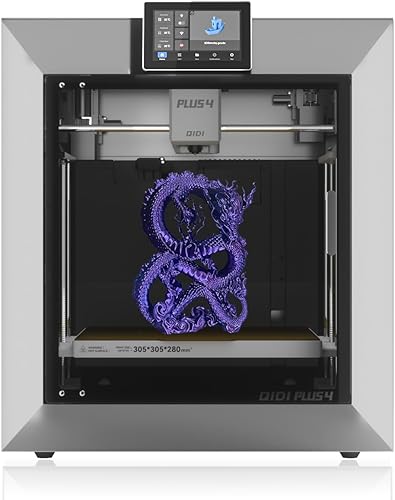
Key Specifications
| Spec | Value |
|---|---|
| Price | $599 |
| Motion System | CoreXY |
| Build Volume | 280x280x270mm |
| Max Print Speed | 600mm/s |
| Enclosure | Fully enclosed with active heated chamber |
| Chamber Temperature | Up to 65°C |
| Firmware | Klipper |
| Nozzle | Hardened steel (abrasive-resistant) |
| Auto Bed Leveling | Yes |
| Air Filtration | Built-in carbon filter |
The Active Heated Chamber
This is why the X-Plus 3 exists, and it deserves detailed examination. When printing ABS, ASA, nylon, or polycarbonate, the ambient temperature surrounding the print matters as much as the bed and nozzle temperatures. If the chamber is too cold, layers cool unevenly, causing warping, layer delamination, and internal stress that weakens the finished part. This is why ABS has a reputation for being “difficult” — it is not difficult on hardware designed for it.
The X-Plus 3’s chamber heater brings the enclosed volume to 60-65 degrees Celsius before printing begins and maintains that temperature throughout the print. Based on specs and print community data, this produces a dramatic improvement in ABS and ASA success rates compared to passively enclosed printers. Warping is reduced to near zero on most geometries, layer adhesion is consistent from bottom to top, and surface quality is noticeably cleaner because layers bond while still warm.
For nylon and polycarbonate, the heated chamber is even more critical. These materials absorb moisture and warp aggressively without ambient heat control. Based on print community data, the X-Plus 3 handles standard nylon filaments with reliability that typically requires $2,000+ industrial machines. Polycarbonate at 65 degrees Celsius is at the lower edge of ideal chamber temperature (80-120 degrees Celsius is preferred industrially), but the print community reports functional polycarbonate parts with acceptable layer adhesion.
The built-in carbon filter addresses the other reality of enclosed high-temperature printing: fumes. ABS and ASA release styrene vapors, and nylon emits its own volatile compounds. The carbon filter reduces but does not eliminate these emissions. Based on community data, most owners still recommend operating the printer in a ventilated space when printing high-temperature materials.
Speed & CoreXY Performance
The CoreXY motion system rated at 600mm/s places the X-Plus 3 in competitive territory with Bambu and Creality speed printers. Based on specs and print community data, practical printing speeds for quality results land at 300-400mm/s for PLA and PETG, and 200-300mm/s for ABS and nylon where layer adhesion benefits from slower deposition.
Klipper firmware provides input shaping and pressure advance, both of which are essential for clean high-speed printing. The X-Plus 3 ships with calibration routines accessible through the touchscreen, and based on print community data, running these calibrations during initial setup makes a measurable difference in print quality at speed.
The 280x280x270mm build volume is generous — larger than the Bambu Lab P1S (256mm cube) (see our Bambu Lab vs QIDI comparison) and adequate for most functional parts and prototypes. For users printing brackets, enclosures, jigs, and structural components in engineering materials, this build volume covers the vast majority of use cases.
Build Quality & Hardware
The X-Plus 3 arrives fully assembled, which is a meaningful advantage at this price point. The enclosed frame uses metal panels rather than acrylic, providing better insulation for the heated chamber and a more rigid structure overall. Based on print community data, the build quality is described as solid but not premium — there are occasional reports of minor fit-and-finish issues, but nothing that affects print performance.
The hardened steel nozzle is a practical inclusion for an engineering-material printer. Standard brass nozzles wear rapidly when printing carbon fiber, glass fiber, or mineral-filled filaments. The hardened steel nozzle handles abrasive materials without degradation, though it has marginally worse thermal conductivity than brass — a tradeoff that is acceptable for the materials this printer is designed to use.
Auto bed leveling works reliably based on print community data. The heated bed reaches 120 degrees Celsius, which is sufficient for ABS, ASA, and nylon adhesion. The PEI build surface provides strong first-layer adhesion across the full range of supported materials.
Software & Ecosystem
The X-Plus 3 runs Klipper with a custom QIDI interface accessible via the built-in touchscreen and web browser. The interface is functional but not as polished as Bambu Studio or the stock Mainsail/Fluidd Klipper interfaces. Based on print community data, most owners find it adequate for daily use, with occasional complaints about menu organization and response speed.
QIDI provides pre-configured profiles for their version of Cura, and the printer also works with PrusaSlicer and OrcaSlicer. For engineering materials, having well-tested slicer profiles matters significantly — temperature settings, retraction distances, and cooling parameters vary dramatically between PLA and nylon. Based on print community data, QIDI’s provided profiles for ABS and nylon are reasonable starting points, though experienced users typically refine them.
The ecosystem is where QIDI falls behind Bambu and Prusa. The community is smaller, third-party documentation is thinner, and troubleshooting resources are less abundant. QIDI’s own support is responsive based on print community data, but the self-service knowledge base that Bambu and Prusa users enjoy does not exist at the same scale.
Pros
- Active heated chamber up to 65 degrees Celsius enables reliable ABS, ASA, and nylon printing
- CoreXY at 600mm/s with Klipper firmware and input shaping
- 280x280x270mm build volume — larger than most competitors at this price
- Fully enclosed with built-in carbon filter for fume management
- Hardened steel nozzle included for abrasive filaments
- Ships fully assembled — no kit build required
- Auto bed leveling and 120 degrees Celsius heated bed
- $599 price dramatically undercuts industrial heated-chamber machines
Cons
- Software interface is functional but less polished than Bambu Studio
- Smaller community and ecosystem compared to Bambu, Prusa, and Creality
- 65 degrees Celsius chamber is below ideal for polycarbonate (80-120 degrees Celsius preferred)
- Carbon filter reduces but does not eliminate fumes — ventilation still recommended
- Occasional fit-and-finish quality control issues reported
- Hardened steel nozzle has slightly worse thermal conductivity than brass
- No multi-color system available
Who Should Buy the QIDI X-Plus 3
The X-Plus 3 is the clear choice for anyone who needs to print ABS, ASA, nylon, or carbon-fiber-filled filaments regularly and cannot justify a $2,000+ industrial printer. Engineers, product designers, robotics teams, and functional-part printers who need material properties beyond PLA and PETG will find the heated chamber invaluable.
It is also a strong choice for users who want an enclosed CoreXY printer with genuine high-temperature capability rather than the passive enclosure found on most competitors. If your prints have failed due to warping or delamination in ABS or nylon on open-frame or passively enclosed printers, the X-Plus 3 solves that problem.
Who Should Skip
If you primarily print PLA and PETG, the heated chamber is unnecessary, and the Bambu Lab P1S at $699 offers a more polished experience with better software and ecosystem. If you need a larger build volume for the same material capabilities, the QIDI X-Max 3 at $799 provides a bigger build plate. If your budget is tight and you only occasionally need ABS, a passively enclosed printer with a DIY heating solution may suffice.
Final Verdict
The QIDI X-Plus 3 does one thing that no other printer under $600 does well: it makes engineering materials reliable. The active heated chamber is not a marketing feature — it is a fundamental capability that transforms ABS from “temperamental” to “straightforward” and makes nylon viable on consumer hardware. Pair that with CoreXY speed, Klipper firmware, and a generous build volume, and the X-Plus 3 occupies a unique and valuable position in the market.
Based on specs and print community data, the X-Plus 3 is the best printer under $600 for engineering materials by a wide margin. The software and ecosystem lag behind Bambu and Prusa, but for its target audience — users who need materials that other consumer printers cannot handle — the heated chamber advantage is decisive.
FAQ
Can the QIDI X-Plus 3 print PLA and PETG too? Yes, and it does so well. The heated chamber can be left off for PLA, and the CoreXY motion system delivers fast, clean prints. However, if you only plan to print PLA and PETG, the heated chamber is wasted, and a Bambu Lab P1S is a better overall choice for those materials.
How does the heated chamber compare to a passively enclosed printer? A passive enclosure (like the Bambu P1S) reaches 35-45 degrees Celsius from residual heat. The X-Plus 3 actively heats to 60-65 degrees Celsius. Based on print community data, this 20-degree difference is the margin between inconsistent and reliable ABS printing, and it is critical for nylon.
Is the air filtration sufficient for ABS fumes? The carbon filter reduces odor and captures some volatile compounds, but based on print community data, it should not be considered a complete solution. Most owners recommend operating the printer in a ventilated space or adding an external exhaust system when printing ABS, ASA, or nylon regularly.
How does the X-Plus 3 compare to the Bambu Lab P1S? The P1S has better software, a larger community, and multi-color capability via AMS. The X-Plus 3 has an active heated chamber, a hardened steel nozzle, and better engineering material support. Choose the P1S for PLA/PETG and ecosystem; choose the X-Plus 3 for ABS, nylon, and functional parts.
Can it print polycarbonate? The 65 degrees Celsius chamber temperature is below the ideal range for polycarbonate (80-120 degrees Celsius), but based on print community data, functional polycarbonate parts are achievable with careful settings. Expect some warping on large flat geometries — the X-Plus 3 handles PC better than open-frame printers but not as well as industrial machines with higher chamber temperatures.