Elegoo Neptune 4 Pro Review: Budget Speed Printing Challenger
The Elegoo Neptune 4 Pro is Elegoo’s pitch for the budget speed-printing crown. At $259, it ships with Klipper firmware, a direct drive extruder, auto bed leveling, and a rated top speed of 500mm/s — specifications that would have sounded absurd at this price just two years ago. It is an open-frame bed-slinger aimed squarely at buyers who want fast printing without paying Bambu or Creality premium prices.
The catch, as always with aggressively priced hardware, is in the details. Klipper firmware delivers the speed potential, but the linear rod motion system and bed-slinger design impose limits that CoreXY competitors do not share. The Neptune 4 Pro is a capable printer with genuine strengths — but understanding where it excels and where it compromises is essential before buying.
Bottom line: The Neptune 4 Pro is the best printer under $300 for users who are comfortable with some tinkering. It delivers impressive speed and print quality for the price, but it lacks the polish and ecosystem of the Bambu Lab A1 Mini and requires more hands-on tuning than plug-and-play alternatives.
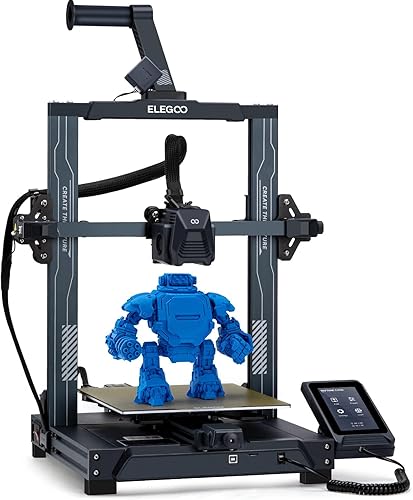
Key Specifications
| Spec | Value |
|---|---|
| Price | $259 |
| Motion System | Bed-slinger (Cartesian) |
| Build Volume | 225x225x265mm |
| Max Print Speed | 500mm/s |
| Enclosure | Open frame |
| Firmware | Klipper |
| Extruder | Direct drive |
| Build Plate | PEI magnetic build plate |
| Auto Bed Leveling | Yes |
| Guide System | Linear rods |
Print Speed & Klipper Performance
The headline 500mm/s figure is a theoretical maximum, and based on specs and print community data, realistic daily printing happens at 250-300mm/s for most users. At those speeds, the Neptune 4 Pro is still genuinely fast — roughly 2-3x faster than a stock Ender 3 and competitive with printers costing twice as much.
Klipper firmware is the engine behind this performance. Unlike Marlin-based printers that run motion planning on an 8-bit or 32-bit board with limited processing power, Klipper offloads computation to a host processor. This enables features like input shaping (which reduces ringing artifacts at high speeds) and pressure advance (which improves extrusion consistency during acceleration and deceleration). The Neptune 4 Pro includes a built-in host processor, so Klipper runs natively without requiring a separate Raspberry Pi.
Based on print community data, the input shaping calibration makes a meaningful difference. Owners who run the built-in calibration routines report noticeably cleaner prints at 250mm/s+ compared to running with default settings. This is a step that many budget printers skip, and it elevates the Neptune 4 Pro above competitors that rely solely on hardware to manage speed artifacts.
Print Quality
At moderate speeds (150-250mm/s), the Neptune 4 Pro produces good quality prints. Surface finish on PLA and PETG models is clean, with well-defined layer lines and minimal stringing when pressure advance is properly configured. The direct drive extruder handles retraction better than Bowden setups, which is a meaningful advantage for prints with lots of travel moves.
At higher speeds approaching 400-500mm/s, quality compromises become visible. Based on print community data, ringing artifacts appear on sharp corners, and layer adhesion can suffer on tall, narrow prints where the bed-slinger motion amplifies vibration. The linear rod guide system is partially responsible — it offers less rigidity than the linear rails found on slightly more expensive competitors like the Creality Ender-3 V3.
The PEI build plate provides reliable adhesion for PLA and PETG. First-layer adhesion is consistent once the auto bed leveling mesh is properly calibrated. Community data indicates that the auto leveling probe is accurate but benefits from running the calibration routine 2-3 times initially to build a reliable mesh.
Build Quality & Design
The Neptune 4 Pro ships partially assembled, with most owners reporting 30-45 minutes of assembly time. The frame is aluminum extrusion, typical of this price range, and provides adequate rigidity for the printer’s speed targets. Based on print community data, the frame does not introduce significant resonance issues at moderate speeds, though some owners report adding frame braces for optimal performance above 300mm/s.
The linear rod guide system is the most notable cost-cutting measure. Linear rods are cheaper to manufacture than linear rails but offer less smoothness and load-bearing capacity. In practice, the difference manifests as slightly more vibration at high speeds and a higher maintenance requirement — the rods need periodic cleaning and lubrication.
The open-frame design keeps costs down but limits material compatibility. ABS and ASA printing is technically possible but unreliable without a DIY enclosure. For PLA, PETG, and TPU, the open frame is perfectly adequate.
Software & Connectivity
The Klipper firmware provides a web-based interface accessible from any browser on the local network. This is genuinely useful — owners can start prints, monitor progress, and adjust settings from a phone or laptop without dedicated software. The interface also exposes Klipper’s advanced tuning options, including PID tuning, input shaping calibration, and pressure advance configuration.
Elegoo provides a customized version of Cura as the recommended slicer, with pre-configured profiles for the Neptune 4 Pro. Based on print community data, these default profiles produce decent results out of the box, though most experienced users migrate to PrusaSlicer or OrcaSlicer for more control. The printer accepts standard G-code, so any slicer works.
One limitation worth noting: the Neptune 4 Pro lacks the cloud printing and mobile app ecosystem that Bambu Lab and Creality offer. Print monitoring requires being on the same local network, and there is no built-in camera for remote observation. For makers who print from home, this is fine. For remote monitoring, it requires additional setup.
Pros
- $259 price delivers Klipper speed, direct drive, and auto leveling — outstanding value
- 500mm/s rated speed with realistic 250-300mm/s daily printing
- Built-in Klipper host processor eliminates the need for a separate Raspberry Pi
- Input shaping and pressure advance improve print quality at speed
- Direct drive extruder handles flexible filaments and reduces stringing
- PEI build plate provides reliable adhesion without adhesives
- 225x225x265mm build volume is generous for the price
- Web-based Klipper interface accessible from any browser
Cons
- Linear rods instead of linear rails limit rigidity at the highest speeds
- Print quality degrades noticeably above 350mm/s
- Open frame prevents reliable ABS/ASA printing without a DIY enclosure
- No cloud printing, mobile app, or built-in camera for remote monitoring
- Default slicer profiles need tuning for optimal results
- Bed-slinger design imposes inherent acceleration limits
- Requires more initial calibration than plug-and-play alternatives
Who Should Buy the Elegoo Neptune 4 Pro
The Neptune 4 Pro is ideal for makers who want fast printing on a tight budget and are comfortable spending an hour or two on initial calibration and tuning. If you enjoy the process of dialing in a printer — running input shaping, tuning pressure advance, experimenting with speed profiles — the Neptune 4 Pro rewards that effort with performance that punches well above its price class.
It is also a strong choice as a second printer for experienced hobbyists who want a dedicated PLA/PETG machine without a large investment. The Klipper web interface makes it easy to manage alongside other printers.
Who Should Skip
If you want a plug-and-play experience with minimal tinkering, the Bambu Lab A1 Mini at $239 offers a more polished out-of-box experience with better software and ecosystem support. If you need an enclosed printer for ABS or engineering filaments, look elsewhere entirely. If you want the best print quality under $300 regardless of speed, the Creality Ender-3 V3 at $289 uses a CoreXZ motion system that offers better rigidity.
Final Verdict
The Elegoo Neptune 4 Pro delivers remarkable specifications for $259. Klipper firmware, direct drive, auto bed leveling, and 500mm/s rated speed at this price would have been unthinkable in 2023. The reality of daily printing is somewhat more modest — 250-300mm/s with good quality — but that is still fast, and the value proposition is genuinely strong.
Based on specs and print community data, the Neptune 4 Pro is the best budget speed printer for users who do not mind getting their hands dirty with calibration. It lacks the polish of the Bambu ecosystem and the rigidity of more expensive hardware, but it compensates with raw capability per dollar that is hard to argue with. For a broader comparison, see our Creality vs Elegoo guide.
FAQ
Does the Neptune 4 Pro really print at 500mm/s? The hardware can reach 500mm/s on straight-line moves, but based on print community data, practical daily printing happens at 250-300mm/s. Print quality degrades significantly above 350mm/s due to vibration from the bed-slinger motion system and linear rod guides.
How does Klipper compare to Bambu’s firmware? Klipper is open-source and highly configurable — it offers more tuning options but requires more manual setup. Bambu’s firmware is closed-source but more polished out of the box. Klipper gives advanced users more control; Bambu gives everyone a smoother experience.
Can the Neptune 4 Pro print flexible filaments like TPU? Yes. The direct drive extruder handles TPU and other flexible filaments better than Bowden setups. Based on community data, printing TPU at reduced speeds (40-60mm/s) produces reliable results.
Is the Neptune 4 Pro better than the Creality Ender-3 V3? The Neptune 4 Pro is $30 cheaper and offers comparable speed. The Ender-3 V3 uses a CoreXZ motion system with better rigidity and benefits from Creality’s larger ecosystem. The Ender-3 V3 is generally considered the better printer; the Neptune 4 Pro is the better value.
Does it need a Raspberry Pi for Klipper? No. The Neptune 4 Pro includes a built-in host processor that runs Klipper natively. No external computer is required — this is a significant advantage over DIY Klipper setups that require a separate Raspberry Pi.