Prusa MK4S Review: Open Source Meets Modern Speed
The Prusa MK4S is the latest refinement of what might be the most influential consumer 3D printer lineage ever made. Since the original MK2, Prusa Research has built its reputation on open-source hardware, relentless iteration, and a community-first philosophy that stands in sharp contrast to the closed ecosystems dominating the market today. The MK4S brings an improved NextGen extruder, refined print quality, and upgraded firmware — all while maintaining the open-source DNA that made Prusa a household name in maker circles.
At $799 for the kit, the MK4S is not the cheapest or fastest printer available. It is a deliberate choice: a printer for people who value transparency, repairability, and community over raw speed benchmarks. The question is whether that philosophy still justifies the price in a market where $699 buys an enclosed CoreXY running at 500mm/s.
Bottom line: The Prusa MK4S is the best open-source FDM printer available. It does not win speed races against CoreXY competitors, but it delivers excellent print quality, unmatched documentation, and the freedom to modify every aspect of your machine. For makers who value that freedom, nothing else comes close.
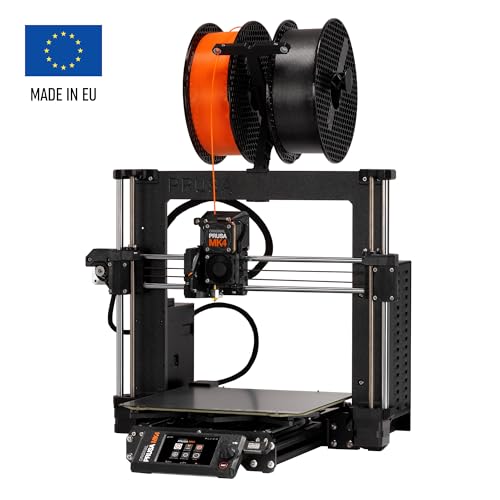
Key Specifications
| Spec | Value |
|---|---|
| Price | $799 (kit) |
| Motion System | Bed-slinger (Cartesian) |
| Build Volume | 250x210x220mm |
| Max Print Speed | 200mm/s |
| Enclosure | Open / optional enclosure available |
| Firmware | Open-source (Prusa Firmware) |
| Extruder | NextGen direct drive |
| Build Plate | Removable PEI spring steel sheets |
| Filament Sensor | Yes |
| Power Loss Recovery | Yes |
Print Quality & Extruder
The MK4S ships with Prusa’s NextGen extruder, an evolution of the loadcell-based system introduced in the MK4. Based on specs and print community data, the upgraded extruder delivers more consistent filament grip, better retraction performance, and reduced stringing compared to its predecessor. The loadcell-based first layer calibration remains one of the most elegant solutions in consumer 3D printing — the nozzle physically measures the distance to the bed rather than relying on a separate probe.
Print quality at 200mm/s is where the MK4S genuinely competes with more expensive machines. Community print comparisons consistently show the MK4S producing cleaner surface finishes on detailed models than many CoreXY printers running at 300-500mm/s. Speed is not everything, and the MK4S proves it — the bed-slinger motion system, when properly tuned, produces layer consistency that is difficult to match at higher velocities.
The removable PEI spring steel sheets are a highlight. Prusa offers smooth, textured, and satin variants, each suited to different materials and aesthetic preferences. Based on print community data, the textured sheet in particular provides reliable first-layer adhesion across PLA, PETG, and ASA without glue or tape.
Speed & Motion System
This is where the MK4S faces its most direct criticism. At 200mm/s, it is measurably slower than the Bambu Lab P1S (500mm/s), Creality K1 (600mm/s), and virtually every CoreXY competitor. A print that takes 2 hours on the MK4S might finish in 45 minutes on a Bambu. For users who print large batches or time-sensitive prototypes, this gap matters.
However, the speed comparison requires context. The MK4S uses a bed-slinger design where the print bed moves along the Y axis. This limits acceleration more than CoreXY systems, but it also means fewer mechanical components and a simpler frame. The tradeoff is intentional — Prusa prioritizes reliability and serviceability over raw throughput.
Based on print community data, most MK4S owners report cruising speeds of 150-180mm/s for quality prints, with 200mm/s reserved for less detailed models. Input shaping support in the firmware helps reduce ringing artifacts at higher speeds, narrowing the quality gap with faster machines.
Open-Source Ecosystem
This is the MK4S’s defining advantage. Every piece of firmware, every CAD file for the frame and extruder, and every modification guide is publicly available. The printer runs open-source firmware that owners can compile, modify, and flash without restriction. PrusaSlicer, the companion slicer, is open-source and widely regarded as one of the best slicers available — even owners of competing printers use it.
The practical implications are significant. If a part breaks, owners can print a replacement or order it from Prusa at cost. If the firmware lacks a feature, the community can add it. If Prusa Research closed tomorrow, the MK4S would remain fully functional and upgradeable. Compare this to closed-ecosystem printers where a discontinued cloud service could render smart features inoperable.
The community surrounding Prusa printers is arguably the deepest in 3D printing. Printables.com, Prusa’s own model repository, hosts millions of files with detailed settings profiles specifically tuned for Prusa hardware. Troubleshooting resources, modification guides, and community firmware builds are available in quantity that no other brand matches.
Material Compatibility
The MK4S handles PLA, PETG, TPU, and ASA reliably out of the box. The open-frame design means ABS printing is possible but not ideal — warping remains an issue without an enclosure. Prusa sells an optional enclosure that addresses this, but it adds cost and footprint.
The filament sensor detects runouts and automatically pauses the print, and power loss recovery resumes prints after outages. These are standard features in 2026, but Prusa’s implementation is consistently described as reliable by the print community — not all power recovery systems actually work well in practice.
For engineering materials like nylon and polycarbonate, the lack of an enclosed heated chamber is a limitation. The optional enclosure provides passive heating but cannot match the active heated chambers found on printers like the QIDI X-Plus 3.
Pros
- Fully open-source hardware and firmware — modify, repair, and upgrade without restrictions
- Excellent print quality at 200mm/s with clean surface finishes
- NextGen extruder with loadcell-based bed leveling is elegant and reliable
- Removable PEI spring steel sheets with multiple surface options
- PrusaSlicer is best-in-class and works with any printer
- Deepest community ecosystem in 3D printing
- Kit build teaches printer mechanics — valuable for long-term troubleshooting
- Filament sensor and power loss recovery work reliably
Cons
- 200mm/s is significantly slower than CoreXY competitors at similar or lower prices
- $799 kit price is steep given that the Bambu Lab P1S offers enclosed CoreXY at $699
- Open frame limits ABS/ASA printing without the optional enclosure add-on
- Bed-slinger design inherently limits acceleration and speed ceiling
- Kit assembly requires 6-8 hours — not a plug-and-play experience
- No heated chamber for engineering-grade filaments
Who Should Buy the Prusa MK4S
The MK4S is the right printer for makers who value transparency, repairability, and community over convenience and speed. If you want to understand how your printer works, modify it without voiding a warranty, and know that replacement parts and firmware will always be available, the MK4S is unmatched.
It is also an excellent choice for educators and makerspaces. The kit build is itself a learning experience, and the open-source ecosystem means students and members can access every resource needed to troubleshoot and improve their machines.
Who Should Skip
If print speed is a priority, the MK4S is the wrong choice. The Bambu Lab P1S runs at 500mm/s in an enclosed frame for $100 less. If you want a plug-and-play experience with zero assembly, the MK4S kit requires a significant time investment before your first print. If you need to print ABS or engineering materials regularly, printers with enclosed heated chambers like the Bambu Lab X1 Carbon are better suited without additional accessories.
Final Verdict
The Prusa MK4S is not the fastest, cheapest, or most feature-packed printer on the market. It is something more specific: the best printer for people who believe open-source matters. The print quality is excellent, the extruder is refined, and the community ecosystem is the deepest in the hobby. At $799, it costs more than closed-source alternatives that outperform it on paper — but it offers something those printers cannot: the guarantee that you own your machine completely. For a detailed comparison, see our Bambu Lab vs Prusa guide.
Based on specs and print community data, the MK4S remains the gold standard for open-source 3D printing. If that philosophy aligns with your values, nothing else comes close.
FAQ
Is the Prusa MK4S worth it over the Bambu Lab P1S? It depends on priorities. The P1S is faster, enclosed, and $100 cheaper. The MK4S offers open-source firmware and hardware, a deeper community, and full repairability. If speed and convenience matter most, choose the P1S. If open-source principles and long-term ownership matter, the MK4S justifies its price.
How long does the MK4S kit take to assemble? Based on print community data, most builders report 6-8 hours for a first-time assembly. Experienced builders complete it in 4-5 hours. Prusa’s assembly manual is among the most detailed in the industry, with step-by-step photos and community comments on each step.
Can the MK4S print ABS reliably? On the open frame, ABS prints are possible but prone to warping and layer splitting. The optional Prusa enclosure significantly improves ABS reliability. Based on community data, most owners who regularly print ABS invest in the enclosure or a third-party alternative.
How does print quality compare to faster CoreXY printers? At equivalent layer heights, the MK4S produces surface finishes that match or exceed many CoreXY printers running at 2-3x the speed. The bed-slinger design, while slower, allows for smooth, consistent movements that benefit surface quality on detailed models.
Is the MK4S a good first printer? The kit version is excellent for technically minded beginners who want to learn. The assembly process teaches printer mechanics that prove invaluable for troubleshooting. However, if you just want to start printing immediately, the pre-assembled version or a plug-and-play alternative may be more appropriate.