Creality Ender-3 V3 Review: Budget Speed Printing Done Right?
The Creality Ender-3 V3 represents a complete reinvention of the most popular 3D printer line ever made. Gone is the bed-slinger Cartesian design that defined the Ender-3 for five generations. In its place is a CoreXZ motion system running Klipper firmware at an advertised 600mm/s, with auto bed leveling via a strain gauge sensor, a direct drive extruder, input shaping, and a PEI spring steel build plate — all for $289. It is the Ender-3 name attached to an entirely different class of machine.
Bottom line: The Ender-3 V3 is the best budget speed printer for users who want fast printing, a larger build volume than the A1 Mini, and do not mind trading Bambu’s polished ecosystem for Creality’s more hands-on approach. At $289, it delivers 600mm/s capability on a 220x220x250mm build area that outpaces everything in its price class on raw specs.
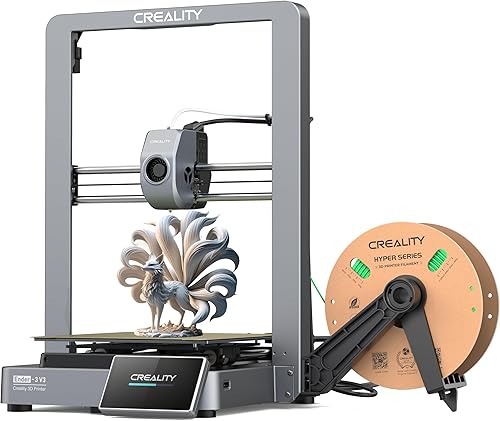
Key Specifications
| Spec | Value |
|---|---|
| Motion System | CoreXZ |
| Max Speed | 600mm/s |
| Build Volume | 220x220x250mm |
| Enclosure | Open frame |
| Auto Leveling | Strain gauge sensor |
| Extruder | Direct drive |
| Firmware | Klipper |
| Input Shaping | Yes |
| Build Plate | PEI spring steel (magnetic) |
| Price | $289 |
Print Quality
The Ender-3 V3 produces good print quality, particularly at moderate speeds. Based on specs and print community data, the CoreXZ motion system keeps the bed stationary on the Y axis — unlike the traditional Ender-3 bed-slinger design — which reduces the mass in motion and allows cleaner prints at higher speeds. The strain gauge auto leveling system provides accurate first-layer calibration without manual adjustment.
At 200-300mm/s, the print quality is competitive with the Bambu Lab A1 Mini. Surface finish is clean, corners are reasonably sharp, and dimensional accuracy is adequate for functional parts and hobby prints. Based on independent benchmarks, the Ender-3 V3 achieves sub-0.15mm dimensional variance at these speeds, which is comparable to other printers in its price class.
At higher speeds (400-600mm/s), quality degrades more noticeably. The input shaping system compensates for resonance, but owner reports indicate that prints above 400mm/s show visible ringing on detailed surfaces. The print community consensus is that 300-400mm/s represents the practical sweet spot for quality-conscious printing — still dramatically faster than previous Ender-3 models.
The default Creality Print slicer profiles are serviceable but not exceptional. Owner data shows that switching to OrcaSlicer or Cura with community-developed profiles yields noticeable improvements in surface finish and retraction performance. This is a common pattern with Creality machines — the hardware outperforms the bundled software.
Speed
The 600mm/s maximum speed is an impressive headline figure for a $289 printer. The CoreXZ architecture enables this by keeping the heavy bed stationary while moving the lighter toolhead in X and Z. Compared to the original Ender-3’s bed-slinger design, which practically topped out at 50mm/s, the improvement is transformative.
Based on print community benchmarks, a benchy (the standard 3D printing test model) completes in approximately 16-20 minutes on the Ender-3 V3 at speed-optimized settings, compared to 90+ minutes on an original Ender-3. At quality-optimized settings (250-350mm/s), the same benchmark takes 25-35 minutes — still a massive improvement.
The Klipper firmware provides the underlying speed optimizations: input shaping reduces ringing artifacts, pressure advance prevents over-extrusion at speed transitions, and motion planning optimizes acceleration profiles. These features work automatically but are also configurable for users who want to fine-tune their setup.
Compared to the Bambu Lab A1 Mini (500mm/s, $239), the Ender-3 V3 offers higher peak speed but similar real-world print times. The A1 Mini’s acceleration tuning and Bambu Studio profiles often compensate for the lower peak speed. The speed advantage of the Ender-3 V3 is most pronounced on larger prints with long travel moves.
Build & Construction
The open-frame CoreXZ design is a departure from every previous Ender-3. The bed sits on the Y axis but does not move during printing — instead, the toolhead moves in X and Z while the bed only moves in Y for layer changes. This hybrid approach keeps cost down while enabling speeds that a pure bed-slinger cannot achieve.
Build quality is good for the price. The frame uses standard aluminum extrusions with adequate rigidity, and the PEI spring steel build plate is a significant upgrade over the glass or plain steel plates of previous Ender-3 models. The magnetic plate allows easy part removal — bend the plate, and prints pop off cleanly. Owner reports praise this build plate as one of the V3’s best features.
The direct drive extruder replaces the Bowden tube setup of earlier Ender-3 models, providing better retraction control and enabling reliable TPU printing. The strain gauge auto leveling sensor is integrated into the hotend, eliminating the separate BLTouch or CR Touch probes that earlier models required.
The open frame means no ABS or ASA printing without a DIY enclosure. This is the same limitation as the Bambu A1 Mini and most other open-frame machines at this price point. For PLA and PETG users, the open frame is a non-issue. For users who need engineering materials, an enclosed machine like the Bambu Lab P1S or Creality K1 Max is the correct choice.
The 220x220x250mm build volume is notably larger than the A1 Mini’s 180mm cube. The extra 40mm per axis on X and Y (and 70mm on Z) accommodates meaningfully larger single-part prints and enables batch printing of more parts per run.
Software & Ecosystem
Creality Print is the bundled slicer, and it is the weakest part of the Ender-3 V3 experience. Based on owner data, the slicer is functional but lacks the profile optimization, stability, and intuitive design of Bambu Studio. The print community widely recommends switching to OrcaSlicer, which has well-maintained Ender-3 V3 profiles and a more capable feature set.
The Creality Cloud app provides basic remote monitoring and print management, though the experience is less polished than Bambu Handy. There is no built-in camera for remote monitoring — users who want print surveillance need to add a third-party webcam or use a separate camera solution.
On the positive side, the Klipper firmware is fully accessible. Users can SSH into the printer, modify configuration files, install additional Klipper plugins (like KlipperScreen or KAMP), and customize behavior extensively. For the Klipper-experienced community, this turns the Ender-3 V3 into a highly capable platform that can be tuned well beyond its stock configuration. For beginners, this accessibility is irrelevant — and the stock experience is where Bambu holds a clear advantage.
There is no multi-color system available. Unlike Bambu’s AMS Lite (compatible with the A1 Mini) or AMS (compatible with the P1S), the Ender-3 V3 has no automated filament-changing solution. Manual filament swaps are the only option for multi-color prints.
Materials Compatibility
The open-frame design limits material options to those that do not require chamber temperature control:
- PLA: Excellent results. The PEI build plate provides strong adhesion, and the direct drive extruder feeds reliably.
- PETG: Reliable with proper temperature settings. The PEI plate works well with PETG, though some users apply glue stick to prevent over-adhesion.
- TPU: Supported via the direct drive extruder. Based on owner data, flexible filaments down to approximately 90A shore hardness print adequately, a significant improvement over previous Ender-3 Bowden-tube models.
- Silk and specialty PLA: Good results with the standard brass nozzle.
ABS, ASA, nylon, and polycarbonate require an enclosure and are not recommended on the stock open-frame configuration. The brass nozzle is also not rated for abrasive filaments — carbon fiber and glass fiber materials require a nozzle upgrade.
Pros
- $289 price with 600mm/s CoreXZ speed — exceptional value
- 220x220x250mm build volume is larger than the A1 Mini’s 180mm cube
- Klipper firmware provides input shaping, pressure advance, and full configurability
- Direct drive extruder handles TPU and reduces retraction issues
- Strain gauge auto leveling eliminates manual bed calibration
- PEI spring steel build plate enables easy part removal
- CoreXZ architecture keeps the bed stationary for cleaner high-speed prints
Cons
- Creality Print slicer is less polished than Bambu Studio — OrcaSlicer recommended
- Open frame makes ABS and ASA unreliable without a DIY enclosure
- No built-in camera for remote monitoring
- No multi-color system available
- Print quality at maximum speed (600mm/s) degrades noticeably
- Out-of-box experience requires more tuning than Bambu competitors
- Software ecosystem lags behind Bambu’s in polish and reliability
Who Should Buy the Creality Ender-3 V3
The Ender-3 V3 is the right choice for budget-conscious users who want fast printing on a larger build area than the A1 Mini and are comfortable with a slightly more hands-on setup experience. It is ideal for users who value the open Klipper firmware and want the ability to customize and tinker with their printer’s configuration.
Ender-3 owners looking to upgrade will find the V3 unrecognizable from their original machine — the CoreXZ architecture, Klipper firmware, and speed capabilities represent a generational leap.
It is also a strong choice for users who plan to use OrcaSlicer or Cura anyway and do not care about Bambu’s proprietary ecosystem. The hardware at this price point is competitive with anything available.
Who Should Skip
Users who prioritize a polished out-of-box experience, multi-color capability, and superior software should spend the extra money on the Bambu Lab A1 Mini at $239 (smaller but more refined) or save up for the Bambu Lab P1S at $699 (enclosed CoreXY with full ecosystem).
If ABS, ASA, or engineering materials are on your list, the open frame is a disqualifier. Choose an enclosed machine.
Beginners who want the lowest-friction first-time experience should favor the A1 Mini, where Bambu Studio profiles and the auto-everything approach reduce the learning curve to near zero. The Ender-3 V3 is not difficult, but it is not as effortless.
For users who want similar specs at an even lower price, the Elegoo Neptune 4 Pro at $259 offers comparable speed and build volume, though with its own software trade-offs.
Final Verdict
The Creality Ender-3 V3 is a genuinely impressive reinvention of the most iconic 3D printer line in the hobby. At $289, it delivers 600mm/s CoreXZ speed, a direct drive extruder, Klipper firmware, and a 220x220x250mm build volume that competes with machines costing significantly more. The hardware earns a strong recommendation.
The software is where it falls short. Creality Print does not match Bambu Studio, and the out-of-box experience requires more effort than Bambu’s plug-and-play approach. Users willing to install OrcaSlicer and spend an hour dialing in profiles will be rewarded with excellent results. Users who want everything to work perfectly from the first power-on should look at Bambu.
For the price, the Ender-3 V3 offers the best raw specs in budget 3D printing. Whether that matters more than ecosystem polish depends entirely on the user. See also our Bambu Lab vs Creality brand comparison.
FAQ
How does the Ender-3 V3 compare to the Bambu Lab A1 Mini? The Ender-3 V3 offers a larger build volume (220x220x250mm vs 180x180x180mm) and higher peak speed (600mm/s vs 500mm/s) for $50 more. The A1 Mini has better software (Bambu Studio), AMS Lite multi-color support, and a more polished out-of-box experience. Build volume and tinkering favor the V3; ecosystem and ease of use favor the A1 Mini.
Is the Ender-3 V3 good for beginners? It is functional for beginners but not the easiest first printer. The auto leveling and Klipper firmware handle the basics, but the slicer profiles need more attention than Bambu’s, and there is no built-in camera for remote monitoring. Beginners who do not mind a slight learning curve will be fine. Those who want the absolute smoothest first experience should consider the A1 Mini.
What is CoreXZ and how is it different from CoreXY? CoreXZ moves the toolhead in the X and Z axes using a coordinated belt system, while the bed moves only in Y. CoreXY moves the toolhead in X and Y while the bed moves only in Z. CoreXY is generally better for high-speed printing because the heavy bed moves the least. CoreXZ is a compromise that keeps cost down while improving over a pure bed-slinger design.
Can I upgrade the Ender-3 V3 with an enclosure? Yes. The print community has developed several DIY enclosure designs, and third-party commercial enclosures are available. Adding an enclosure enables ABS and ASA printing. The Klipper firmware can be configured to account for the changed thermal environment.
Does the Ender-3 V3 support multi-color printing? Not natively. There is no AMS equivalent or automated filament-changing system available for the Ender-3 V3. Manual filament swaps at layer changes are possible through slicer-based color change commands, but this is a hands-on process, not an automated one.