Creality K1 Max Review: The Best Large-Format Speed Printer?
The Creality K1 Max makes a simple pitch: the biggest enclosed build volume in its price class at a speed that rivals or exceeds the competition. At $687, it delivers a 300x300x300mm CoreXY platform that hits 600mm/s, an AI camera for print monitoring, a built-in air purifier, and auto bed leveling — all enclosed in a chamber that handles ABS and ASA. It is Creality’s answer to the Bambu Lab P1S, trading software polish for raw build volume.
Bottom line: The K1 Max is the best large-format enclosed printer under $700. If your projects regularly exceed what a 256mm build plate can handle, the K1 Max delivers the extra space without sacrificing speed or requiring an open frame. The software ecosystem lags behind Bambu, but the hardware capability is genuine.
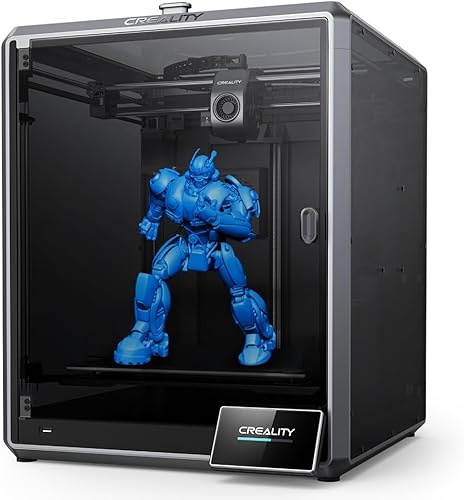
Key Specifications
| Spec | Value |
|---|---|
| Motion System | CoreXY |
| Max Speed | 600mm/s |
| Build Volume | 300x300x300mm |
| Enclosure | Fully enclosed |
| AI Camera | Yes — print monitoring and timelapse |
| Air Purifier | Built-in activated carbon filter |
| Auto Leveling | Yes (automatic) |
| Extruder | Direct drive |
| Firmware | Klipper-based (Creality custom) |
| Price | $687 |
Print Quality
The K1 Max produces good print quality, though it requires more tuning than Bambu’s offerings to reach its full potential. Based on specs and print community data, the default Creality Print slicer profiles are functional but not as refined as Bambu Studio’s. Owner reports indicate that the best results come after adjusting retraction settings, temperature profiles, and speed limits to match specific filaments — a process that takes an hour or two but yields significant improvements.
At moderate speeds (200-300mm/s), the K1 Max produces surface finishes comparable to the Bambu Lab P1S. The input shaping system handles resonance compensation well, minimizing the ringing and ghosting artifacts that plague high-speed printers with less sophisticated firmware tuning. At maximum speed (600mm/s), quality degrades noticeably — print community benchmarks show that 400-450mm/s is the practical ceiling for quality-conscious prints.
Dimensional accuracy is good, with owner reports showing sub-0.15mm variance on calibrated machines. This is slightly behind the Bambu P1S’s sub-0.1mm, but adequate for functional parts, prototypes, and most hobby applications. The difference is most visible on small, detailed models where tight tolerances matter.
Speed
The 600mm/s maximum speed is the highest advertised figure among the printers in its class — 100mm/s faster than Bambu’s 500mm/s spec. In real-world printing, however, the gap narrows considerably. Based on print community benchmarks, both the K1 Max and the P1S achieve similar total print times on standardized test models, because acceleration, deceleration, and travel moves matter more than peak linear speed for most geometries.
Where the K1 Max’s speed genuinely shines is on large, simple parts that allow extended straight-line travel. On a 300mm-wide part with long infill lines, the printer can actually sustain higher speeds for longer than it could on a 256mm bed. For batch printing multiple smaller parts spread across the larger build plate, the speed advantage is real but modest.
The Klipper-based firmware provides input shaping and pressure advance, both of which are essential for maintaining quality at high speeds. Creality’s implementation works, though the print community notes that custom Klipper configurations (for users comfortable editing cfg files) can extract better performance than the stock setup.
Build & Construction
The 300x300x300mm build volume is the K1 Max’s defining feature. It offers roughly 60% more printable volume than the Bambu P1S’s 256mm cube — a difference that is immediately apparent when printing large functional parts, cosplay props, terrain pieces, or batch runs of smaller objects. Projects that require splitting into three or four pieces on a 256mm bed often fit in a single print on the K1 Max.
The enclosed chamber is functional, keeping ambient temperature stable enough for ABS and ASA printing. It does not reach the same passive chamber temperatures as the Bambu enclosures based on owner temperature measurements, but it is sufficient for the materials most users need. The built-in activated carbon air purifier filters VOCs and particles during ABS printing — a thoughtful inclusion that eliminates the need for a separate air filtration solution.
Build quality is solid but not premium. The frame is rigid enough to support 600mm/s printing, and the CoreXY motion system uses quality linear rails. Owner reviews occasionally mention fit-and-finish details that feel less polished than Bambu’s machines — panel gaps, minor rattles at high speeds, and cable management that could be tidier. These are cosmetic issues that do not affect print quality, but they are noticeable.
The direct drive extruder handles standard filaments well, with reliable feeding and retraction. The AI camera provides print monitoring and failure detection, though print community consensus places its accuracy below the Bambu X1 Carbon’s camera system. It catches major failures (spaghetti, complete detachment) but can miss subtler issues.
Software & Ecosystem
Creality Print is the included slicer, and this is where the K1 Max falls furthest behind the Bambu competition. Based on owner data, Creality Print is functional but less intuitive, less stable, and less well-optimized than Bambu Studio. Many experienced users in the print community switch to Cura or OrcaSlicer for better results, which requires manual profile configuration.
The Creality Cloud app provides remote monitoring, print management, and model sharing. The experience is adequate but not as polished as Bambu Handy. Firmware updates are less frequent, and the print community occasionally reports bugs that take weeks to address.
On the positive side, the Klipper-based firmware is more accessible to tinkerers than Bambu’s locked ecosystem. Users can SSH into the printer, modify Klipper configuration files, and customize behavior in ways that Bambu does not allow. For the Klipper-experienced community, this is a meaningful advantage. For beginners who want things to work without configuration, it is irrelevant.
There is no native multi-color system equivalent to Bambu’s AMS. Third-party solutions exist but are less integrated and more complex to set up. If multi-color printing is a priority, the Bambu P1S is the better choice.
Materials Compatibility
The K1 Max handles a reasonable range of materials:
- PLA, PETG: Reliable results with proper profiles. The direct drive extruder feeds consistently.
- ABS, ASA: Functional with the enclosed chamber. Owner data shows generally good results, though some users report needing to add supplemental chamber heating for larger ABS prints in colder environments.
- TPU: Supported through the direct drive extruder. Flexible filaments print adequately, though the print community notes slightly more stringing than on Bambu’s extruder design.
- PA (Nylon): Possible but inconsistent without supplemental chamber heating. Not recommended for critical applications.
The standard brass nozzle is not rated for abrasive filaments. Carbon fiber and glass fiber materials require a nozzle swap to hardened steel, which is available aftermarket but not included. This is a common limitation at this price point.
Pros
- 300x300x300mm build volume — the largest enclosed option under $700
- 600mm/s advertised speed with Klipper-based firmware
- Enclosed chamber enables ABS and ASA printing
- Built-in AI camera for print monitoring and failure detection
- Built-in air purifier filters VOCs during printing
- Klipper firmware is accessible to tinkerers who want customization
- Competitive price at $687 — just $12 less than the Bambu P1S
Cons
- Software ecosystem (Creality Print, Creality Cloud) lags behind Bambu Studio
- Print quality out of the box requires more tuning than Bambu competitors
- No native multi-color system equivalent to AMS
- AI camera accuracy is below the Bambu Lab X1 Carbon’s failure detection
- Build quality finish is less polished than Bambu’s machines
- Default slicer profiles are not as well-optimized as Bambu Studio’s
Who Should Buy the Creality K1 Max
The K1 Max is the right choice for users whose primary constraint is build volume. If you regularly print parts larger than 256mm in any dimension — large functional enclosures, cosplay helmets, terrain tiles, RC car bodies, drone frames — the K1 Max’s 300mm cube solves the problem without requiring an open-frame machine that cannot handle ABS.
It is also well-suited for users who want Klipper access and the ability to modify their printer’s firmware configuration. The open Klipper platform allows a level of customization that Bambu’s locked ecosystem does not.
Batch production users who benefit from the larger bed area for printing multiple parts simultaneously will also find value in the K1 Max’s footprint advantage.
Who Should Skip
Users who prioritize software polish, out-of-box quality, and a frictionless experience should choose the Bambu Lab P1S at $699. It costs $12 more, but the ecosystem advantage is substantial.
If you need even more build volume and do not require an enclosure, the Sovol SV08 at $499 offers a large build area on an open-frame Voron-style platform.
Beginners should strongly consider the P1S or Bambu Lab A1 Mini instead. The K1 Max’s need for profile tuning and less intuitive software make the first-time experience rougher than Bambu’s plug-and-play approach.
Final Verdict
The Creality K1 Max is the best large-format enclosed 3D printer under $700, and build volume is its defining argument. The 300mm cube handles projects that simply do not fit on 256mm competitors, and it does so at a speed and quality level that — with proper tuning — approaches the Bambu P1S.
The trade-off is clear: the software ecosystem, out-of-box experience, and multi-color support all favor Bambu. The K1 Max wins on size. For users who need that size, nothing else in this price range matches it. For everyone else, the P1S remains the safer, more polished choice. For a full brand comparison, see our Bambu Lab vs Creality guide.
FAQ
How does the K1 Max compare to the Bambu Lab P1S? The K1 Max offers a 300mm build volume versus the P1S’s 256mm, and a higher advertised speed (600mm/s vs 500mm/s). The P1S has a better software ecosystem (Bambu Studio vs Creality Print), AMS multi-color support, better out-of-box calibration, and more polished build quality. If build volume is the priority, choose the K1 Max. For everything else, the P1S is the stronger choice.
Is the AI camera useful? It catches major print failures — spaghetti, complete bed detachment, and severe layer shifts — and pauses the print automatically. Based on print community data, it is less accurate than the Bambu X1 Carbon’s AI detection but still useful for saving filament on unattended prints. The timelapse feature is a nice bonus.
Can I use OrcaSlicer or Cura instead of Creality Print? Yes, and many experienced owners recommend it. OrcaSlicer in particular has well-developed K1 Max profiles contributed by the community, and most users report better results than the stock Creality Print profiles. The printer accepts standard G-code, so any slicer that supports Klipper can be configured to work.
How loud is the K1 Max? Owner reports describe noise levels around 50-55dB at moderate speeds. It is slightly louder than the enclosed Bambu printers, with some owners noting increased noise at speeds above 400mm/s. The enclosed chamber helps dampen noise, but the larger moving mass of the bigger CoreXY gantry produces more mechanical sound.
Does the K1 Max work with an AMS? No. The Bambu AMS is proprietary and only works with Bambu printers. The K1 Max does not have a native multi-color solution. Third-party filament changers can be adapted, but the integration is not as seamless as Bambu’s system.