Bambu Lab A1 Mini Review: The Best Entry-Level 3D Printer?
The Bambu Lab A1 Mini has done something remarkable: it brought 500mm/s printing, multi-color capability, and a polished plug-and-play experience to the $239 price point. In a market segment that was previously dominated by printers requiring hours of assembly and calibration before producing a decent first print, the A1 Mini simply works out of the box. It prints fast, it prints well, and it does so at a price that makes 3D printing accessible to anyone even mildly curious about the hobby.
Bottom line: The A1 Mini is the best entry-level 3D printer available. Its combination of speed, print quality, AMS Lite multi-color support, and Bambu’s software ecosystem creates a package that no competitor at this price point can match. The only meaningful limitation is the 180mm build volume.
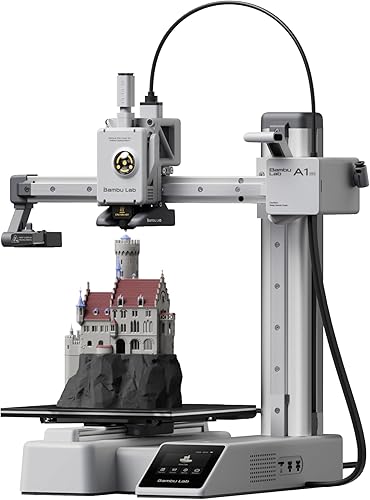
Key Specifications
| Spec | Value |
|---|---|
| Motion System | Bed-slinger (Cartesian) |
| Max Speed | 500mm/s |
| Build Volume | 180x180x180mm |
| Enclosure | Open frame |
| Multi-Color | AMS Lite compatible (4 colors) |
| Auto Leveling | Yes (automatic) |
| Build Plate | PEI textured spring steel |
| Vibration Compensation | Yes (input shaping) |
| Interface | Full-color touchscreen |
| Price | $239 |
Print Quality
The A1 Mini produces print quality that has no business existing at $239. Based on specs and print community data, the output is consistently compared to printers costing two to three times the price. Dimensional accuracy is tight, surface finish is smooth, and detail reproduction on small models is genuinely impressive. Independent benchmarks show the A1 Mini matching or exceeding the Creality Ender-3 V3 SE, Creality K1, and even some machines in the $500+ range on standardized test prints.
The vibration compensation system is the key enabler. At 500mm/s on a bed-slinger design, ringing and ghosting artifacts would normally be severe. The A1 Mini’s input shaping algorithms compensate for the mechanical resonances of the moving bed, producing clean corners and crisp details at speeds that would wreck quality on an uncompensated machine.
Owner reports consistently highlight the first-print experience. The auto bed leveling, pre-loaded Bambu Studio profiles, and minimal setup mean most users go from unboxing to a completed print in under an hour. For beginners who have never touched a 3D printer, this removes the most frustrating barrier to entry.
Speed
The 500mm/s maximum speed is the same figure advertised by the Bambu Lab P1S and X1 Carbon — machines costing three to six times as much. In practice, the A1 Mini achieves real-world speeds of 200-350mm/s at quality settings most users are happy with, which is still dramatically faster than previous-generation budget printers that topped out at 40-60mm/s.
The bed-slinger architecture means the bed moves on the Y axis, which adds mass that limits practical acceleration compared to CoreXY designs. Based on print community benchmarks, the A1 Mini is noticeably slower than the P1S on complex prints with many direction changes. For simple geometric parts and most everyday prints, however, the speed difference is less pronounced than the architecture difference might suggest.
Print times that took 6-8 hours on an Ender-3 V2 routinely complete in 2-3 hours on the A1 Mini. For users upgrading from older budget printers, this alone justifies the purchase.
Build & Construction
The A1 Mini is an open-frame design, which keeps the price down but introduces limitations. There is no enclosure, which means ABS and ASA printing is unreliable without a DIY enclosure solution. The print community strongly recommends sticking to PLA, PETG, and silk filaments on the A1 Mini unless you build or buy an aftermarket enclosure.
Build quality is solid for the price point. The frame is rigid enough to support the speed the printer achieves, the PEI build plate provides excellent adhesion and easy part removal, and the full-color touchscreen is responsive and intuitive. Owner reports rarely mention build quality complaints, which is unusual for a sub-$250 printer.
The 180x180x180mm build volume is the A1 Mini’s most significant limitation. It handles small to medium projects well — phone cases, figurines, desk organizers, mechanical parts — but larger projects like helmets, drone frames, and terrain pieces require splitting across multiple prints. Users who know they need larger prints should consider the Bambu Lab A1 at $399 with its 256x256x256mm build volume.
The compact footprint is a genuine advantage for users with limited desk space. The A1 Mini fits comfortably on a standard desk without dominating the workspace.
Software & Ecosystem
Bambu Studio and Bambu Handy provide the same polished software experience as the P1S and X1 Carbon. Pre-configured print profiles for major filament brands eliminate the tedious calibration that defines the first-time experience on most budget printers. Cloud printing, remote monitoring via the built-in camera, and over-the-air firmware updates work seamlessly.
The print community consistently identifies Bambu’s software ecosystem as the A1 Mini’s biggest competitive advantage over alternatives at this price point. Competing budget printers either ship with less capable slicers (Creality Print) or rely on users configuring Cura or PrusaSlicer themselves. For beginners, the difference is significant — Bambu Studio profiles produce good prints without requiring the user to understand retraction settings, temperature towers, or flow calibration.
The proprietary ecosystem trade-off applies here as it does across Bambu’s lineup: the experience is smooth but closed. Users who want to run Klipper, OctoPrint, or fully customizable firmware are choosing the wrong ecosystem.
Materials Compatibility
The open-frame design limits the A1 Mini to materials that do not require chamber temperature control:
- PLA: The A1 Mini’s primary material. Results are excellent across brands.
- PETG: Reliable with the included PEI build plate. Minor stringing can usually be resolved with profile adjustments.
- Silk and specialty PLA: The print community showcases stunning results with silk, marble, and wood-fill PLA variants.
- TPU: Supported, though the direct drive extruder handles it better than Bowden-tube designs common at this price.
ABS, ASA, nylon, and polycarbonate are not recommended without an enclosure. The open frame allows drafts and temperature fluctuations that cause warping and layer adhesion failures with these materials.
The AMS Lite adds 4-color multi-material capability for $99. Based on owner data, the AMS Lite integrates cleanly and expands the A1 Mini’s creative potential significantly. Multi-color PLA prints from the A1 Mini are regularly shared in the print community, and the results are indistinguishable from those off machines costing five times the price.
Pros
- $239 price makes high-quality 3D printing genuinely accessible
- 500mm/s speed delivers 2-3x faster prints than previous-generation budget printers
- Print quality rivals machines costing two to three times the price
- AMS Lite compatibility enables 4-color multi-material prints for an additional $99
- Bambu Studio and Bambu Handy provide a polished, beginner-friendly software experience
- Auto bed leveling and pre-configured profiles minimize the learning curve
- Compact footprint fits on any desk
Cons
- 180mm build volume limits project size — larger prints must be split
- Open frame makes ABS, ASA, and nylon unreliable without a DIY enclosure
- Bed-slinger design limits real-world acceleration compared to CoreXY machines
- AMS Lite sold separately at $99
- Proprietary ecosystem restricts firmware customization
- No heated chamber means temperature-sensitive materials are off limits
Who Should Buy the Bambu Lab A1 Mini
First-time 3D printer buyers should start here. The A1 Mini removes every barrier that historically made budget 3D printing a frustrating experience — assembly complexity, calibration headaches, poor slicer profiles — and replaces them with a plug-and-play machine that produces excellent prints immediately.
Students, hobbyists with limited budgets, makers who want a secondary printer for small parts, and anyone curious about 3D printing but unwilling to spend $700+ on an unproven hobby will find the A1 Mini is the ideal entry point.
It is also an excellent gift. Based on owner data, recipients with zero 3D printing experience regularly produce successful first prints without assistance.
Who Should Skip
Users who know they need to print large objects should consider the Bambu Lab A1 at $399 for the full 256mm build volume, or step up to the P1S at $699 for an enclosed CoreXY experience.
Anyone who needs ABS, ASA, or engineering material printing should buy an enclosed printer — the P1S at $699 is the logical upgrade.
If budget is even tighter, the Creality Ender-3 V3 SE at $179 is a capable alternative, though it sacrifices speed, print quality, and ecosystem polish.
Final Verdict
The Bambu Lab A1 Mini is the best entry-level 3D printer available, and it is not particularly close. At $239, it delivers speed, print quality, multi-color capability, and a software experience that makes every other budget printer feel outdated. The 180mm build volume is the only meaningful constraint, and for most beginners, it is adequate for the first several months of printing.
The A1 Mini has effectively ended the debate about what beginners should buy. Unless you need a larger build volume or an enclosed chamber, this is the answer.
FAQ
Is the A1 Mini good enough for experienced users? Yes, as a secondary or dedicated small-parts printer. Many experienced users in the print community run an A1 Mini alongside a P1S or X1 Carbon for quick prototypes and small functional parts. The print quality does not hold it back — only the build volume does.
Should I buy the A1 Mini or the A1 Mini Combo? If multi-color printing interests you, the Combo (which includes the AMS Lite) is the better value. The AMS Lite purchased separately costs $99, and the Combo typically saves $30-50 over buying them individually. If you only plan to print single-color parts, the base A1 Mini at $239 is sufficient.
Can the A1 Mini print ABS? Technically yes, but results are unreliable without an enclosure. The open frame allows drafts that cause warping and layer separation with ABS. The print community recommends sticking to PLA and PETG, or building/buying a third-party enclosure if ABS is necessary.
How does the A1 Mini compare to the Creality Ender-3 V3 SE? The A1 Mini is faster (500mm/s vs 250mm/s), has better print quality out of the box, offers multi-color capability via AMS Lite, and benefits from Bambu’s superior software ecosystem. The Ender-3 V3 SE costs $60 less at $179 and has a slightly larger build volume (220x220x250mm). For most users, the A1 Mini is worth the extra $60.
What size prints can I make on 180mm? A 180mm cube accommodates most phone cases, figurines up to about 7 inches, small mechanical parts, desk organizers, and board game inserts. Helmets, large cosplay pieces, and items wider than about 7 inches will need to be split into multiple parts.