Bambu Lab P1S Review: The Best 3D Printer for Most People?
The Bambu Lab P1S occupies a rare position in consumer electronics: it is the mid-range option that most people should actually buy. At $699, it shares the same CoreXY motion system, 500mm/s speed, and 256mm build volume as the $1,449 Bambu Lab X1 Carbon, wrapped in a fully enclosed chassis with AMS compatibility for multi-color printing. What it drops — the AI camera, hardened steel nozzle, and lidar flow calibration — are features that matter to a specific subset of users, not the majority.
Bottom line: The P1S is the best 3D printer for most people. It delivers enclosed CoreXY performance, multi-color capability, and Bambu’s polished ecosystem at a price that makes nearly every competitor feel like a compromise in one direction or another.
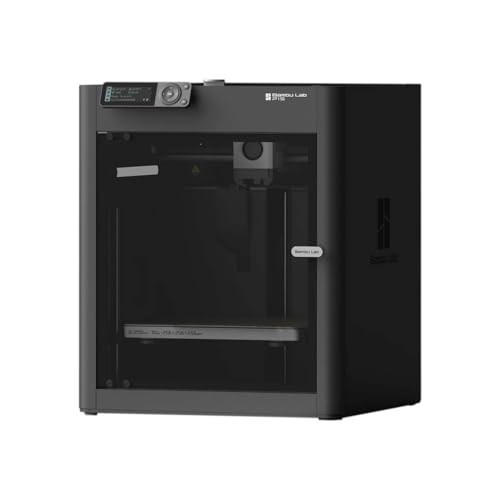
Key Specifications
| Spec | Value |
|---|---|
| Motion System | CoreXY |
| Max Speed | 500mm/s |
| Build Volume | 256x256x256mm |
| Enclosure | Fully enclosed |
| Multi-Color | AMS-compatible (sold separately) |
| Nozzle | Stainless steel (standard) |
| Auto Calibration | Bed leveling, vibration compensation |
| Build Plate | PEI textured spring steel |
| Firmware | Klipper-based |
| Price | $699 |
Print Quality
The P1S produces print quality that was reserved for $2,000+ machines just two years ago. Based on specs and print community data, the CoreXY kinematics paired with vibration compensation and pressure advance deliver surface finishes that consistently impress across PLA, PETG, ABS, and ASA. Dimensional accuracy is reported at sub-0.1mm by multiple independent benchmarks.
Owner reports indicate that the out-of-box print quality requires minimal tuning. The pre-configured Bambu Studio profiles are well-optimized for common filament brands, and most users report successful first prints within 30 minutes of unboxing. This stands in sharp contrast to competitors in the same price range that often require hours of manual calibration before delivering comparable results.
The auto bed leveling system works reliably. The vibration compensation system, while not as sophisticated as the X1 Carbon’s lidar-assisted version, is effective enough that speed-induced ringing artifacts are minimal at typical printing speeds. The print community consensus is clear: for the vast majority of print jobs, the quality difference between the P1S and the X1 Carbon is negligible.
Speed
The 500mm/s advertised speed is achievable, though most users find optimal quality at 250-350mm/s for detailed prints and 400-500mm/s for functional parts where surface finish is less critical. The 20,000mm/s acceleration is where the real speed advantage lives — short moves and complex geometry complete noticeably faster than on bed-slinger designs.
Based on print community benchmarks, a typical print that takes 4-5 hours on an Ender-3 class machine completes in 1.5-2 hours on the P1S at comparable quality settings. This is not marketing inflation — the CoreXY architecture, combined with Bambu’s firmware tuning, delivers a genuine 2-3x speed improvement over traditional designs.
The Klipper-based firmware handles input shaping and pressure advance transparently. Users do not need to understand or configure these features — they work out of the box. This is a significant advantage over DIY Klipper setups that require manual resonance testing and configuration.
Build & Construction
The enclosed chassis is a defining feature at this price point. The polycarbonate and steel construction provides thermal stability for ABS and ASA printing while also dampening noise. Owner reports describe the P1S as noticeably quieter than open-frame competitors, with operating noise around 45-50dB at moderate speeds.
The enclosure means ABS warping is largely a solved problem. Print community data shows consistent ABS and ASA results without the drafts, temperature fluctuations, and adhesion issues that plague open-frame machines. For users who need engineering materials, the enclosure alone justifies choosing the P1S over open-frame competitors like the Creality Ender-3 V3.
Build quality is solid throughout. The linear rails feel precise, the PEI build plate provides excellent adhesion and easy part removal, and the overall fit-and-finish reflects thoughtful engineering. Owner reviews rarely mention build quality complaints — which, for a $699 printer, is notable.
The 256x256x256mm build volume handles the vast majority of projects. It is not the largest available — the Creality K1 Max offers 300mm per side — but it accommodates most functional parts, figurines, and prototypes without splitting.
Software & Ecosystem
Bambu Studio is the heart of the experience, and it is one of the best slicers available at any price. Based on PrusaSlicer, it adds Bambu-specific features like cloud printing, AMS management, and remote monitoring through the Bambu Handy mobile app. Print profiles are pre-configured and well-tested for major filament brands.
Cloud printing through Bambu Handy allows users to start prints, monitor progress via the camera (built-in, non-AI), and manage print queues remotely. The experience is polished and reliable — a significant differentiator over competitors whose remote monitoring feels like an afterthought.
The ecosystem is proprietary, which is the P1S’s most common criticism. The firmware is closed, OctoPrint is not natively supported, and the cloud platform is required for remote features. Users who want full transparency and control over their printer’s firmware will find this limiting. For everyone else, the trade-off is a smoother, more reliable experience than open-source alternatives typically deliver.
Materials Compatibility
The P1S handles the standard range of FDM materials well:
- PLA, PETG: Flawless. The pre-configured profiles deliver excellent results with minimal tuning.
- ABS, ASA: Reliable thanks to the enclosed chamber. Owner data shows consistent success without the warping issues common on open-frame machines.
- TPU: Supported via the direct drive extruder. Flexible filaments down to approximately 90A shore hardness print reliably.
- PA (Nylon): Possible with the enclosure, though the standard stainless steel nozzle is not optimized for glass-filled variants.
The main limitation compared to the X1 Carbon is the stainless steel nozzle. Carbon fiber and glass fiber filaments will wear it over time. Users who need abrasive filament support can swap to a hardened steel nozzle aftermarket, but it is not included in the box. For the majority of users printing PLA, PETG, ABS, and TPU, the standard nozzle is more than adequate. For help choosing between filament types, see our PLA vs ABS vs PETG comparison.
Pros
- Enclosed CoreXY at $699 — unmatched value in this class
- 500mm/s speed with 20,000mm/s acceleration delivers 2-3x faster prints than bed-slingers
- Out-of-box quality requires near-zero calibration
- AMS compatibility for up to 16-color multi-material prints
- Bambu Studio slicer and cloud printing via Bambu Handy are polished and reliable
- Enclosed chamber enables reliable ABS, ASA, and nylon printing
- PEI build plate provides excellent adhesion and easy part removal
Cons
- AMS sold separately at $249 — the Combo bundle at $899 includes it
- Proprietary ecosystem limits firmware access and third-party integrations
- No AI failure detection camera (X1 Carbon exclusive)
- Standard nozzle is not rated for abrasive filaments like carbon fiber
- 256mm build volume is smaller than the Creality K1 Max’s 300mm
Who Should Buy the Bambu Lab P1S
The P1S is the default recommendation for anyone buying a 3D printer in 2026 who does not have a specific reason to choose something else. Hobbyists, designers, small business owners, educators, and anyone who wants fast, reliable, high-quality FDM printing without a steep learning curve should start here.
It is particularly well-suited for users stepping up from entry-level machines like the Ender-3 series or the Bambu Lab A1 Mini. The enclosed chamber, CoreXY speed, and Bambu’s ecosystem represent a transformative upgrade in capability and convenience.
If multi-color printing is a priority, the Bambu Lab P1S Combo at $899 bundles the AMS unit and represents better value than buying both separately.
Who Should Skip
Budget-constrained users who primarily print PLA should consider the Creality K1 at $399 or the Bambu Lab A1 Mini at $239. Both deliver excellent print quality at lower price points, though with trade-offs in enclosure and ecosystem.
Users who need abrasive filament support (carbon fiber, glass fiber) should step up to the X1 Carbon for the hardened steel nozzle and AI camera. Users who need a larger build volume should look at the Creality K1 Max’s 300mm cube.
Open-source advocates who want full firmware control, OctoPrint compatibility, and community-driven development should consider a Prusa MK4S or Voron-based alternative.
Final Verdict
The Bambu Lab P1S is the best 3D printer for most people. That statement has been true since its release, and it remains true in 2026. The combination of enclosed CoreXY performance, 500mm/s speed, AMS multi-color capability, and Bambu’s mature software ecosystem at $699 creates a value proposition that no competitor has matched.
It is not the most capable printer — the X1 Carbon handles abrasive filaments and adds AI failure detection. It is not the cheapest — the A1 Mini and Creality K1 cost significantly less. But for the intersection of capability, reliability, and price that matters to most users, the P1S sits squarely in the sweet spot.
FAQ
What is the difference between the P1S and the X1 Carbon? The X1 Carbon adds an AI failure detection camera, a hardened steel nozzle for abrasive filaments (carbon fiber, glass fiber), and a lidar-based flow calibration system. For users printing PLA, PETG, ABS, and TPU, the print quality difference is negligible. The P1S costs $750 less.
Should I buy the P1S or the P1S Combo? If you plan to do multi-color printing, the Combo at $899 (which includes the AMS unit) is the better value. Buying the P1S and AMS separately costs approximately $950. If you do not need multi-color printing, the base P1S at $699 is sufficient — you can add the AMS later.
Can the P1S print ABS reliably? Yes. The enclosed chamber is the key enabler. Owner reports consistently show successful ABS and ASA prints without the warping, cracking, and adhesion issues common on open-frame machines. The enclosure maintains stable chamber temperatures that keep ABS from cooling too quickly.
How loud is the P1S? Owner reports describe the P1S as quiet for a high-speed printer, at approximately 45-50dB during normal operation. The enclosed chamber dampens mechanical noise significantly compared to open-frame alternatives. It is suitable for home office environments.
Is the P1S good for beginners? Yes — arguably the best option for beginners who can afford $699. The auto bed leveling, pre-configured slicer profiles, and minimal assembly mean most users produce successful prints within their first hour. The learning curve is significantly flatter than nearly any competitor in this price range.