Bambu Lab X1 Carbon Review: Still the Best Premium FDM Printer?
The Bambu Lab X1 Carbon is the flagship of Bambu’s FDM lineup and the printer that effectively reset the industry’s expectations for what a consumer-grade machine should deliver. At $1,449, it pairs a CoreXY motion system hitting 500mm/s with a fully enclosed chamber, hardened steel nozzle for abrasive filaments, AI-powered failure detection via an onboard camera, and support for up to 16-color printing through the AMS system. It is the everything-included option in a lineup where the Bambu Lab P1S already covers most users’ needs.
Bottom line: The X1 Carbon remains the most capable consumer FDM printer available. The AI camera, carbon fiber capability, and full auto-calibration suite justify the premium over the P1S for users who print with engineering materials or need maximum reliability on long, unattended prints. But for PLA and PETG users, the $750 savings on a P1S is hard to ignore.
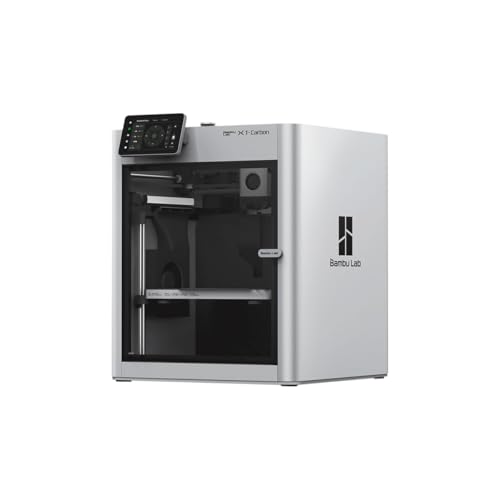
Key Specifications
| Spec | Value |
|---|---|
| Motion System | CoreXY |
| Max Speed | 500mm/s |
| Build Volume | 256x256x256mm |
| Enclosure | Fully enclosed |
| Multi-Color | AMS support (up to 16 colors) |
| Nozzle | Hardened steel (abrasive-filament ready) |
| AI Camera | Yes — failure detection and timelapse |
| Auto Calibration | Full (bed leveling, vibration comp, flow, XY) |
| Carbon Fiber Capable | Yes |
| Price | $1,449 |
Print Quality
The X1 Carbon delivers what is widely regarded as the best print quality in consumer FDM. Based on specs and print community data, the combination of CoreXY kinematics, pressure advance, and vibration compensation produces surface finishes that rival machines costing twice the price from just a few years ago. Dimensional accuracy is consistently reported at sub-0.1mm variance across all axes.
Where the X1 Carbon separates from the P1S is in its full auto-calibration suite. The printer automatically compensates for vibration, flow rate, and XY alignment before every print — or on demand. Owner reports indicate this produces more consistent results across different filament brands and types, particularly when switching between materials frequently. The P1S shares some of these features but lacks the lidar-based flow calibration that the X1 Carbon performs automatically.
Print quality with carbon fiber and glass fiber filaments is where the hardened steel nozzle earns its keep. These abrasive materials destroy standard brass nozzles within a few hundred grams of printing. The X1 Carbon handles them natively, and owner data shows long-term nozzle life well beyond what any brass-equipped competitor can manage.
Speed
The 500mm/s maximum speed matches the P1S and remains competitive in the broader market. While Creality advertises 600mm/s on the Creality K1 Max, real-world cruising speeds for quality prints tend to cluster in the 250-400mm/s range across all these machines. Based on print community benchmarks, the X1 Carbon holds its quality at higher speeds more consistently than most competitors, largely due to the superior vibration compensation and the rigidity of the enclosed frame.
Acceleration matters more than peak speed for real print times, and the X1 Carbon’s 20,000mm/s acceleration is among the highest available. Short moves and complex geometries complete faster — which is where most of the actual time savings come from in typical prints. Owner data consistently shows total print times comparable to or better than machines advertising higher peak speeds.
Build & Construction
The fully enclosed chamber is steel and polycarbonate, providing both thermal stability and structural rigidity. The enclosure is not just an aesthetic choice — it enables reliable printing of ABS, ASA, PA (nylon), and other temperature-sensitive materials that warp on open-frame machines. The chamber can reach and maintain elevated temperatures passively through the heated bed, and print community data confirms consistent success with engineering filaments.
Build quality is premium throughout. The linear rails, the toolhead design, and the overall fit-and-finish reflect the price point. Owner reviews consistently describe the X1 Carbon as feeling like a professional tool rather than a hobbyist device. The touchscreen interface is responsive and well-designed, providing real-time monitoring, filament management, and print control without needing a phone or computer.
The 256x256x256mm build volume is adequate for most projects but not class-leading. The Creality K1 Max offers 300mm per side, and some users find the X1 Carbon’s volume limiting for larger props, cosplay pieces, or functional enclosures. For the price, a larger build area would strengthen the value proposition.
Software & Ecosystem
Bambu Studio is the slicer, and it remains one of the best available — polished, fast, and packed with features including tree supports, adaptive layer heights, and detailed per-object settings. Cloud printing through Bambu Handy allows remote monitoring, print start, and real-time camera feeds from anywhere with an internet connection.
The AI camera system is exclusive to the X1 Carbon within Bambu’s lineup. It monitors prints in real-time and detects failures — spaghetti, layer shifts, and bed adhesion problems — then pauses the print automatically. Based on owner data, the detection accuracy is high enough to save significant material on long unattended prints. It also generates timelapse videos automatically, which the print community widely appreciates.
The ecosystem is proprietary, and this remains a point of contention. Bambu Studio is closed-source, the firmware is locked, and the cloud platform is required for remote features. Users who want full control over their firmware, the ability to run OctoPrint, or complete offline operation may find this limiting. Third-party slicers work but lose access to some Bambu-specific optimizations.
Materials Compatibility
This is the X1 Carbon’s clearest advantage over the P1S and most competitors. The hardened steel nozzle and enclosed chamber combine to handle the full range of consumer and engineering filaments:
- Standard: PLA, PETG, TPU — flawless, as expected
- Engineering: ABS, ASA, PA (nylon), PC (polycarbonate) — reliable with the enclosed chamber
- Abrasive: Carbon fiber PLA/PETG/PA, glass fiber reinforced — the hardened steel nozzle handles these without degradation
- Flexible: TPU down to 85A shore hardness — the direct drive extruder manages soft filaments well
Owner reports indicate consistent success with materials that require chamber temperatures above 40°C, which open-frame printers and even some enclosed competitors struggle to maintain. For anyone printing functional parts in engineering materials, this breadth of compatibility is a genuine differentiator. For help choosing between filament types, see our PLA vs ABS vs PETG comparison.
Pros
- Full auto-calibration suite (vibration, flow, XY) ensures consistent quality across materials
- AI camera detects failures and pauses prints, saving hours of wasted filament
- Hardened steel nozzle handles carbon fiber and glass fiber filaments without wear
- Enclosed chamber enables reliable ABS, ASA, nylon, and polycarbonate printing
- Best-in-class software ecosystem with Bambu Studio and cloud monitoring
- 500mm/s speed with 20,000mm/s acceleration delivers fast, high-quality prints
- AMS support for up to 16-color prints
Cons
- $1,449 is a steep premium when the P1S covers 90% of the same capability for $699
- 256mm build volume is smaller than the Creality K1 Max’s 300mm cube
- Proprietary ecosystem limits firmware access and third-party integrations
- AMS unit sold separately ($249), pushing multi-color cost above $1,700
- The AI camera, while effective, is not sufficient justification alone for the $750 premium over the P1S
Who Should Buy the Bambu Lab X1 Carbon
The X1 Carbon is the right choice for users who regularly print with abrasive or engineering filaments — carbon fiber nylon, glass fiber PETG, polycarbonate — and need a machine that handles these materials without nozzle swaps or manual calibration. It is also the pick for anyone running long, unattended prints where the AI failure detection provides genuine value: print farms, overnight prints, and multi-day jobs where catching a failure at hour two saves 20 hours of wasted time and filament.
Small businesses and professional prototypers who need reliable, repeatable results across a wide material range will find the full calibration suite and enclosed chamber worth the premium.
Who Should Skip
PLA and PETG users who do not need abrasive filament support should buy the Bambu Lab P1S instead. It shares the same CoreXY platform, speed, and build volume at $699 — saving $750 that could buy an AMS unit and a year’s worth of filament. If build volume is the priority over material range, the QIDI X-Plus 3 offers a heated chamber at a lower price point.
Users who want open-source firmware, OctoPrint compatibility, or full control over their printer’s software stack should also look elsewhere. The Bambu ecosystem is polished but closed.
Final Verdict
The Bambu Lab X1 Carbon remains the most capable consumer FDM printer available. The AI camera, hardened steel nozzle, full auto-calibration, and enclosed chamber create a package that no single competitor matches across every dimension. For engineering material users and professional workflows, it justifies the $1,449 price.
But the value calculation has changed since Bambu released the P1S. The $750 gap buys a lot of filament, and for users who primarily print PLA and PETG, the P1S delivers 90% of the X1 Carbon’s capability at half the cost. The X1 Carbon is the best — but “best” and “best value” are not the same thing.
FAQ
Is the X1 Carbon worth the upgrade over the P1S? Only if you need features the P1S lacks: the AI failure detection camera, the hardened steel nozzle for abrasive filaments, and the full lidar-assisted auto-calibration. If you primarily print PLA and PETG and do not run long unattended prints, the P1S delivers nearly identical results for $750 less.
Can the X1 Carbon print carbon fiber filament? Yes. The hardened steel nozzle is specifically designed for abrasive filaments including carbon fiber PLA, carbon fiber PETG, carbon fiber nylon, and glass fiber reinforced materials. These filaments destroy brass nozzles within hours, but the X1 Carbon handles them natively.
Does the AI camera actually work? Based on print community data, the AI failure detection catches spaghetti failures, layer shifts, and bed adhesion issues with high accuracy. It is not perfect — subtle failures like minor under-extrusion can go undetected — but for the major failures that waste hours of print time, owner reports consistently describe it as effective and worth having.
How loud is the X1 Carbon? Owner reports indicate noise levels around 45-50dB during printing at moderate speeds, comparable to a quiet conversation. The enclosed chamber dampens noise considerably compared to open-frame alternatives. At maximum speed, noise increases but remains within reasonable range for a home office environment.
Does the X1 Carbon come with the AMS? No. The AMS (Automatic Material System) is sold separately for approximately $249. Bambu occasionally offers combo deals that bundle the printer with an AMS unit. The X1 Carbon supports up to four AMS units for a maximum of 16 filament slots.