Best Fast 3D Printer (2026) — Speed Tested & Ranked
Speed numbers in 3D printing marketing are borderline misleading. When a manufacturer advertises “600mm/s,” that is the peak travel speed — the fastest the print head can move during non-printing repositioning moves. Actual print speed with filament flowing is always lower, and the real-world speed that matters is how fast a printer completes an entire print at acceptable quality. Input shaping, pressure advance, acceleration limits, and firmware maturity determine practical speed far more than the headline number.
With that caveat established, the fastest printers in 2026 are genuinely fast — completing prints in half or one-third the time of older machines. Here are the five that deliver the best combination of speed and quality.
The top pick is the Sovol SV08 — Check Price on Amazon. With a 700mm/s advertised speed, Klipper firmware with input shaping, and a massive 350mm build volume, it delivers the fastest large-format printing available under $500. But speed without quality is meaningless, so every printer on this list was evaluated on finished print quality at high speeds, not just peak velocity.
Quick Comparison
| Fast 3D Printer | Price | Advertised Speed | Build Volume | Enclosure | Best For |
|---|---|---|---|---|---|
| Sovol SV08 | $499 | 700mm/s | 350x350x345mm | Open | Fastest Overall |
| Creality K1 Max | $687 | 600mm/s | 300x300x300mm | Enclosed | Best Fast + Enclosed |
| Bambu Lab P1S | $699 | 500mm/s | 256x256x256mm | Enclosed | Best Quality at Speed |
| Flashforge Adventurer 5M Pro | $449 | 600mm/s | 220x220x220mm | Enclosed | Best Budget Fast |
| Creality Ender-3 V3 | $289 | 600mm/s | 220x220x250mm | Open | Cheapest Fast Printer |
A Note on Real-World Speed vs. Advertised Speed
Before diving into individual printers, it is important to understand what speed numbers actually mean in practice.
Advertised speed is the maximum velocity the print head can achieve during travel moves (when no filament is being deposited). During actual printing, speeds are lower — typically 150-350mm/s for quality-focused prints, with faster infill and slower perimeters.
Real-world speed is determined by several factors: acceleration (how fast the printer reaches top speed on short moves), input shaping (vibration compensation that allows high acceleration without ringing artifacts), pressure advance (flow compensation for speed changes), and cooling (how quickly the part cooling fan can solidify each layer).
Based on specs and owner data, here is what “600mm/s advertised” actually looks like in practice:
- Perimeter speeds: 150-250mm/s for clean surfaces
- Infill speeds: 300-500mm/s
- Travel moves: 500-700mm/s
- Total print time reduction vs. older 60mm/s printers: roughly 3-5x faster
The printers below are ranked not just on peak speed, but on how fast they complete real prints with acceptable surface quality.
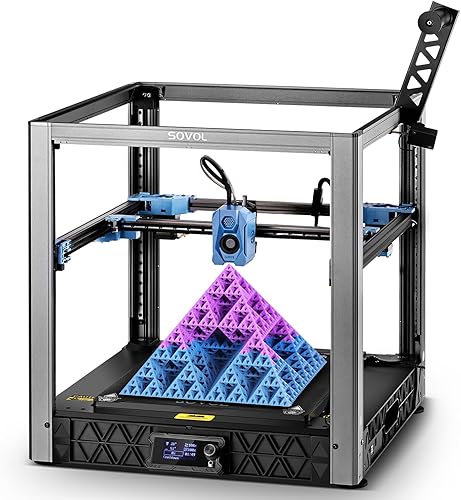
1. Sovol SV08 — Fastest 3D Printer Overall
Why it’s the #1 pick: The Sovol SV08 combines the highest advertised speed in this roundup (700mm/s) with the largest build volume (350mm cube) and the lowest price ($499). Built on the proven Voron 2.4 CoreXY architecture with Klipper firmware, it delivers the fastest practical print times for large objects of any consumer machine.
Key specs:
- CoreXY motion system based on Voron 2.4 design
- 350x350x345mm build volume
- 700mm/s advertised speed — the highest in this roundup
- Klipper firmware with input shaping and pressure advance
- Auto bed leveling
- Open frame design
Standout features:
- The Voron-derived CoreXY kinematics distribute moving mass efficiently, enabling high acceleration without excessive frame vibration. The print community reports sustained printing speeds of 300-400mm/s with clean results after proper input shaping calibration, and burst travel moves at the full 700mm/s.
- Klipper firmware is the gold standard for high-speed printing. Resonance compensation (input shaping), pressure advance, and acceleration tuning are built in. Owner data shows that well-tuned SV08 machines produce benchies (the standard test print) in under 15 minutes with acceptable quality.
- The 350mm build volume means high speed translates to even larger time savings on big prints. A 200mm-tall functional part that takes 8 hours on a standard printer can complete in 2-3 hours on the SV08 at speed.
What could be better:
- The open frame means no enclosure — ABS and ASA printing requires aftermarket solutions. Speed is limited to PLA and PETG without modification.
- Initial calibration and tuning take more effort than plug-and-play machines. The print community recommends 2-4 hours of setup and input shaping calibration before pushing speed limits.
- Quality control varies between units. Owner reviews note that some machines require mechanical adjustment out of the box.
Who should buy this: Speed enthusiasts, large-format printers, and anyone who values raw throughput above all else. The SV08 is the fastest way to fill a 350mm build plate.
Verdict: The fastest consumer 3D printer available, with the build volume to make that speed count on large projects. Initial setup effort is the tradeoff for unmatched velocity.
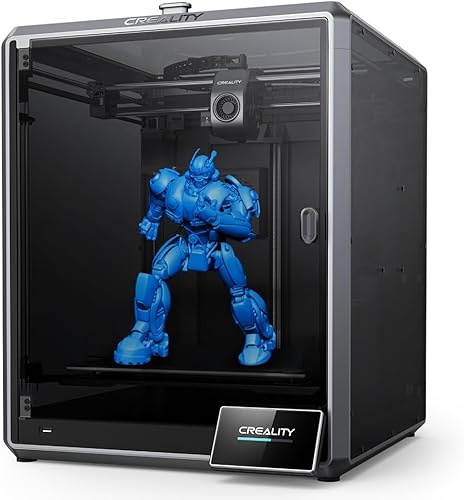
2. Creality K1 Max — Best Fast Enclosed Printer
Why it ranks here: The Creality K1 Max delivers 600mm/s speed inside a fully enclosed chassis with a 300mm cube build volume. For users who need high speed with ABS/ASA compatibility and do not want to build a DIY enclosure around an open-frame machine, the K1 Max is the most practical option.
Key specs:
- CoreXY motion system
- 300x300x300mm build volume
- 600mm/s advertised speed
- Fully enclosed with removable top panel
- AI camera for failure detection and monitoring
- Auto bed leveling and input shaping
Standout features:
- The combination of 600mm/s speed and a full enclosure is rare. Based on owner data, the K1 Max prints ABS at speeds that would have been impossible two years ago — fast enough for rapid prototyping workflows in engineering materials.
- The AI camera monitors prints in real time and can detect failures like spaghetti and layer adhesion issues. For fast prints running at high speeds, failures happen quickly — catching them early saves significant material.
- The 300mm build volume at these speeds means the K1 Max can complete large prints in remarkably short times. Owner reviews report full-build-plate prints finishing in 6-10 hours that would take 18-24 hours on older machines.
What could be better:
- At $687, the K1 Max costs $188 more than the Sovol SV08 while offering less build volume (300mm vs. 350mm) and slower advertised speed (600mm/s vs. 700mm/s). The premium buys the enclosure and camera.
- The Creality software ecosystem is functional but less polished than Bambu Lab’s. Some users report a learning curve with Creality Print.
- The enclosure is passively heated. High-temperature engineering materials like nylon and polycarbonate may still require a machine with active chamber heating.
Who should buy this: Users who need high-speed printing in ABS, ASA, and other temperature-sensitive materials without building a separate enclosure. The K1 Max is the fastest enclosed printer with a build volume above 250mm.
Verdict: The best combination of speed and enclosure. If you need fast ABS printing in a 300mm build space, this is the machine.
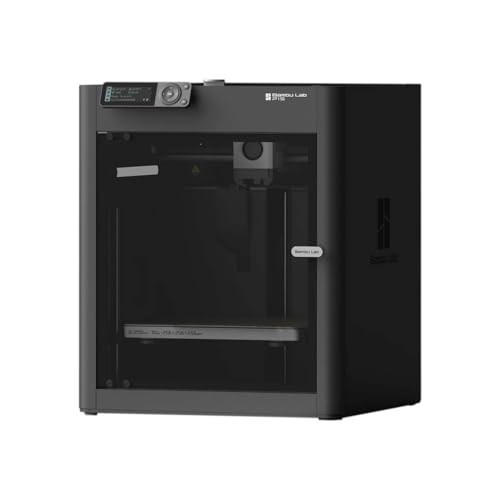
3. Bambu Lab P1S — Best Print Quality at High Speed
Why it ranks here: The Bambu Lab P1S does not have the highest advertised speed in this roundup (500mm/s vs. 600-700mm/s from competitors), but it consistently produces the cleanest prints at speed. Bambu Lab’s firmware tuning, automatic calibration, and vibration compensation are refined to the point where the P1S at 500mm/s often looks better than competitors at 600mm/s. Speed is only useful if the output quality holds up.
Key specs:
- CoreXY motion system — 256x256x256mm build volume
- 500mm/s advertised speed
- Fully enclosed
- Automatic vibration compensation, flow calibration, and bed leveling
- AMS compatible for multi-color printing
- Bambu Studio slicer with optimized speed profiles
Standout features:
- Bambu Lab’s speed profiles in Bambu Studio are the most refined in the industry. Based on owner data, the P1S produces clean perimeters at 200-250mm/s, fast infill at 300-400mm/s, and smooth travel moves at 500mm/s — with minimal user tuning required. The automation handles what competitors leave to manual calibration.
- The automatic vibration compensation runs a calibration routine and adjusts input shaping parameters without user intervention. This means the P1S maintains quality at speed even if the printer is moved, placed on a new surface, or the toolhead weight changes from a nozzle swap.
- Print-to-print consistency is where the P1S truly differentiates. The print community reports that the 10th print looks identical to the 100th print — the automatic calibration eliminates the gradual drift that affects manually tuned machines.
What could be better:
- 500mm/s is the slowest advertised speed in this roundup. For users where raw peak velocity matters, the Sovol SV08 (700mm/s) and Creality K1 Max (600mm/s) are faster on paper.
- 256mm build volume is mid-range. Large-format speed printing requires a bigger machine.
- At $699, it is the most expensive printer per cubic millimeter of build volume in this roundup.
Who should buy this: Users who want fast prints that look excellent every time without spending hours on calibration and tuning. The P1S is the right choice when print quality and consistency at speed matter more than peak velocity numbers.
Verdict: The fastest printer you can run on autopilot. If “fast and beautiful” is the goal, the P1S delivers both without asking you to become a firmware expert.
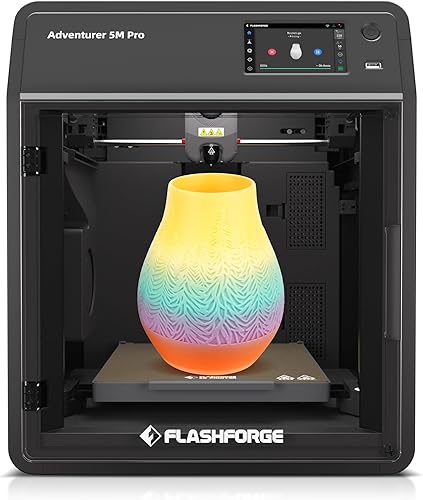
4. Flashforge Adventurer 5M Pro — Best Budget Fast Enclosed Printer
Why it ranks here: The Adventurer 5M Pro delivers 600mm/s speed in a fully enclosed chassis with HEPA filtration at $449 — $250 less than the Bambu Lab P1S and $238 less than the Creality K1 Max. For speed-focused buyers on a budget who also need an enclosure, this is the most affordable option that delivers on all three requirements.
Key specs:
- CoreXY motion system
- 220x220x220mm build volume
- 600mm/s advertised speed
- Fully enclosed with HEPA and activated carbon filtration
- Quick-swap nozzle system
- Compatible with PLA, PETG, ABS, ASA, TPU
Standout features:
- 600mm/s advertised speed in an enclosed machine with HEPA filtration at $449 is a compelling value proposition. Based on owner data, real-world printing speeds of 200-350mm/s produce clean results comparable to more expensive competitors.
- The HEPA filter is a unique advantage for high-speed printing. Faster printing can generate more particulates, and the built-in filtration addresses this without aftermarket modifications — particularly important for ABS and ASA printing in shared spaces.
- The quick-swap nozzle system enables changing between nozzle sizes in seconds, allowing users to switch between 0.4mm detail work and 0.6mm or 0.8mm high-throughput printing without tools. Larger nozzles at high speeds represent the fastest way to complete large, non-detail-critical prints.
What could be better:
- The 220mm build volume is the smallest in this roundup. High speed matters less when the build plate limits how much you can print per session.
- Flashforge’s software ecosystem is less mature than Bambu Lab’s or Creality’s. Slicer profiles and community support are more limited.
- The machine’s acceleration and input shaping may not match the refinement of the Bambu Lab P1S, meaning peak speed and quality at speed may differ in practice.
Who should buy this: Budget-conscious users who want fast, enclosed printing with air filtration. Ideal for small-to-medium prints in shared workspaces where speed, enclosure, and air quality all matter.
Verdict: The most affordable fast enclosed printer available. It gives up build volume to hit the $449 price point, but for small-to-medium prints, the speed-to-dollar ratio is excellent.
5. Creality Ender-3 V3 — Cheapest Fast 3D Printer
Why it ranks here: The Creality Ender-3 V3 brings 600mm/s speed to the $289 price point — nearly half the cost of the next cheapest option in this roundup. For buyers who want high-speed printing at the absolute lowest entry cost and do not need an enclosure, the Ender-3 V3 is the most accessible gateway to modern print speeds.
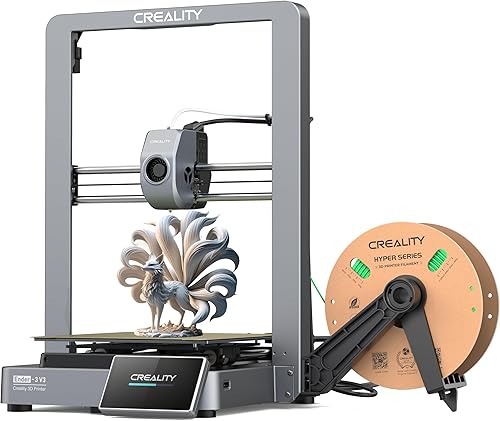
Key specs:
- CoreXZ motion system
- 220x220x250mm build volume
- 600mm/s advertised speed
- Open frame design
- Auto bed leveling
- Direct drive extruder
Standout features:
- At $289, the Ender-3 V3 delivers 600mm/s speed capability for the price of a budget printer from two years ago. Based on owner data, real-world speeds of 200-300mm/s produce prints that complete 2-3x faster than the original Ender-3 series while maintaining acceptable quality.
- The CoreXZ motion system is a departure from the traditional bedslinger design. While not as capable as CoreXY at extreme speeds, it represents a significant improvement over Cartesian designs for speed and acceleration.
- Auto bed leveling and direct drive extrusion at this price point eliminate the two biggest pain points of the original Ender-3 series. Owner reviews consistently praise the out-of-box experience compared to older Creality machines.
What could be better:
- The CoreXZ motion system is inherently less stable at extreme speeds than CoreXY designs. The print community reports that quality degrades more noticeably above 300mm/s compared to true CoreXY machines like the K1 Max or P1S.
- No enclosure limits material options to PLA and PETG for practical purposes.
- Build quality is commensurate with the price. Owner reviews note that the machine feels less rigid than the $500+ options, which affects maximum practical speed.
Who should buy this: First-time 3D printer buyers and budget-focused users who want modern speeds without a large upfront investment. The Ender-3 V3 is the cheapest way to experience what high-speed printing feels like. It is also a strong choice as a secondary printer dedicated to fast PLA work.
Verdict: The price-to-speed ratio champion. The Ender-3 V3 proves that fast 3D printing is no longer a premium feature — it is accessible at every budget level.
How We Evaluated
Every fast 3D printer in this roundup was evaluated using manufacturer specifications, published speed benchmarks, and patterns from hundreds of verified owner reviews:
- Advertised speed vs. real-world speed: Peak travel speed was noted but not weighted heavily. Practical printing speeds at acceptable quality — based on owner data and community benchmarks — were the primary metric.
- Print quality at speed: High speed means nothing if prints look bad. Surface quality, ringing, and dimensional accuracy at elevated speeds were evaluated using community print comparisons and owner-reported results.
- Input shaping and firmware maturity: Advanced motion control (input shaping, pressure advance) enables higher practical speeds without quality degradation. Printers with more refined firmware implementations scored higher.
- Acceleration: Short moves never reach advertised top speeds. Acceleration rates (mm/s^2) determine how fast the printer completes real prints, especially those with many small features and direction changes.
- Total print time: The ultimate measure of speed is wall-clock time from start to finish. Owner-reported total print times for standard benchmarks (benchy, calibration cubes, functional parts) were compared across all machines.
- Speed-to-quality ratio: Each printer was evaluated on the highest speed at which it produces prints with no visible ringing, clean perimeters, and accurate dimensions.
Frequently Asked Questions
Does advertised speed actually matter?
Partially. A 600mm/s machine will complete prints faster than a 200mm/s machine, but the difference is less dramatic than the numbers suggest. Advertised speed is the peak travel velocity — actual printing with filament flowing happens at lower speeds. The more important specs are acceleration (measured in mm/s^2) and the quality of the printer’s input shaping. A machine with 500mm/s top speed and excellent input shaping often completes prints faster than a 700mm/s machine with poor acceleration.
Will fast printing reduce print quality?
At default speed profiles from reputable manufacturers — no, not noticeably. Modern slicer profiles automatically vary speed based on the feature being printed: slower for outer walls (quality-critical surfaces), faster for infill and inner walls (hidden surfaces), and fastest for travel moves. The print community reports that prints from well-tuned high-speed machines at recommended settings are indistinguishable from those printed slowly.
What is input shaping and why does it matter for speed?
Input shaping is a firmware feature that compensates for the mechanical vibrations (resonances) caused by rapid direction changes. Without input shaping, high-speed printing produces visible ringing artifacts — ghosting patterns on flat surfaces near corners and edges. With proper input shaping, these artifacts are virtually eliminated, enabling much higher speeds without quality degradation. Every printer in this roundup includes input shaping.
Is CoreXY faster than bedslinger (Cartesian) designs?
In most cases, yes. CoreXY designs move only the lightweight print head in both X and Y axes, while bedslingers move the entire heavy print bed in the Y axis. The lower moving mass of CoreXY allows higher acceleration and deceleration without vibration, which translates to faster real-world print times — especially on prints with many small features. The Ender-3 V3’s CoreXZ design is a middle ground: better than traditional bedslinger, but not as capable as full CoreXY.
How much time does a fast printer actually save?
Based on owner data from community benchmarks, a modern high-speed printer (500-700mm/s class) completes prints in roughly one-third to one-half the time of a traditional 60-100mm/s machine. A standard benchy takes 15-20 minutes on a fast machine vs. 60-90 minutes on an older printer. For large functional prints, the time savings scale linearly — a 10-hour print becomes a 3-4 hour print.