Best 3D Printer Under $200 (2026) — What You Can Actually Get
Here is the honest truth about 3D printing under $200: the options are very limited. Most printers at this price cut corners on speed, auto-leveling, build quality, or all three. There are dozens of no-name machines on Amazon under $200, and the print community warns against nearly all of them — unreliable hardware, nonexistent support, and print quality that will frustrate rather than inspire.
But there are two genuinely good options at this price, and one that sits right at the boundary. If your budget is firmly locked under $200, these are worth buying. If you can stretch to $239, you should — the Bambu Lab A1 Mini at that price is a dramatically better machine than anything available for less.
Quick Comparison
| 3D Printer | Price | Build Volume | Speed | Auto-Level | Best For |
|---|---|---|---|---|---|
| Creality Ender-3 V3 SE | $179 | 220x220x250mm | 250mm/s | Yes | Best Under $200 |
| Elegoo Neptune 4 | $199 | 225x225x265mm | 500mm/s | Yes | Fastest Under $200 |
| Bambu Lab A1 Mini | $239 | 180x180x180mm | 500mm/s | Yes | Best Just Over $200 |
1. Creality Ender-3 V3 SE — Best 3D Printer Under $200
Why it’s #1: At $179, the Ender-3 V3 SE is the only printer under $200 that the print community broadly recommends without caveats. It includes auto bed leveling, a direct drive extruder, and 250mm/s speed — three features that used to cost $350+. It is the floor for genuinely good 3D printing.
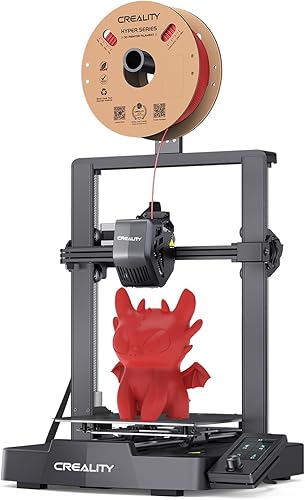
Key specs:
- 220x220x250mm build volume — generous for this price
- 250mm/s max speed
- Auto bed leveling with CR Touch
- Direct drive extruder
- Open frame design
- PEI spring steel build plate
Standout features:
- Auto bed leveling is the single most important feature for any budget printer, and the V3 SE includes it. Manual bed leveling is the number one source of frustration for new users, and skipping it entirely transforms the first-print experience.
- The 220x220x250mm build volume is remarkably large for $179. It matches printers costing $100-150 more, including the AnkerMake M5C ($299) and Creality K1 ($399). For functional prints, organizers, and medium-sized projects, this is more than enough space.
- The Ender-3 community is the largest in 3D printing. Every possible issue has been documented, every upgrade has been tested, and replacement parts are available from dozens of sources. Based on owner data, this community support network is a major reason why the Ender-3 remains so popular.
What could be better:
- 250mm/s is half the speed of the Elegoo Neptune 4 and Bambu A1 Mini. Prints that take 1 hour on a 500mm/s machine take roughly 2 hours on the V3 SE. For users printing regularly, this adds up.
- No input shaping or pressure advance means quality degrades faster as speed increases compared to Klipper-equipped competitors.
- The slicer experience is basic. Creality Print works but most users should switch to Cura or PrusaSlicer for better print profiles and more control.
Who should buy this: Budget-conscious buyers who want the cheapest genuinely good 3D printer available. Students, first-time buyers testing the hobby, and anyone who needs a large build volume without spending over $200.
Verdict: The cheapest 3D printer worth buying in 2026. The Ender-3 V3 SE proves that $179 can get you a real, functional, reliable 3D printer — just not a fast one.
2. Elegoo Neptune 4 — Fastest Under $200
Why it ranks here: The Neptune 4 brings 500mm/s speed and Klipper firmware to the sub-$200 bracket at $199. It is twice as fast as the Ender-3 V3 SE on paper, and owner data confirms meaningfully shorter print times at comparable quality. If speed matters more than the $20 savings, the Neptune 4 is worth the step up.
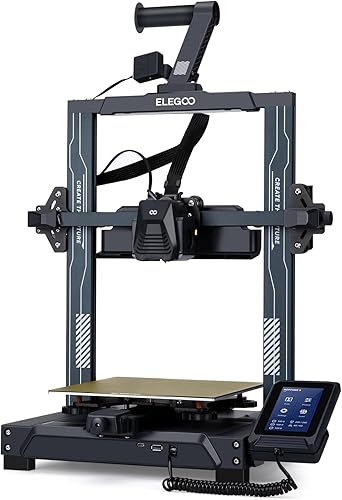
Key specs:
- 225x225x265mm build volume — slightly larger than the Ender-3 V3 SE
- 500mm/s max speed
- Klipper firmware with pressure advance and input shaping
- Auto bed leveling
- Direct drive extruder
- Open frame with PEI build plate
Standout features:
- 500mm/s speed with Klipper’s input shaping produces quality at speeds the Ender-3 V3 SE simply cannot reach. Based on owner data, the Neptune 4 maintains acceptable print quality at 250-350mm/s, cutting print times by 30-50% compared to the V3 SE at its usable speed range.
- Klipper firmware provides advanced features — pressure advance, input shaping, and web-based remote monitoring — that are typically found on $300+ printers. For users who plan to learn and optimize, the Neptune 4 offers a higher ceiling.
- The 225x225x265mm volume is slightly larger than the V3 SE on all three axes. The difference is modest, but it means a few more models fit without scaling down.
What could be better:
- At $199, it only barely qualifies for this roundup. For $40 more, the Bambu A1 Mini offers dramatically better print quality and software — a jump that the print community considers one of the best value upgrades in the hobby.
- Out-of-box print quality requires more tuning than the Ender-3 V3 SE. Based on owner data, first-layer adhesion and retraction settings frequently need adjustment to achieve good results.
- Elegoo’s community and support resources are less extensive than Creality’s massive Ender-3 ecosystem. Troubleshooting can require more independent effort.
Who should buy this: Users who want the fastest possible printer under $200 and are comfortable with some initial slicer tuning. Klipper enthusiasts on a strict budget. Anyone who prints frequently enough that the speed difference over the V3 SE justifies the $20 premium.
Verdict: The fastest printer under $200. The Neptune 4 trades the Ender-3 V3 SE’s plug-and-play simplicity for meaningfully faster prints, making it the better choice for users who will print regularly.
3. Bambu Lab A1 Mini — Best Just Over $200 (Strong Recommendation)
Why it’s included: At $239, the Bambu Lab A1 Mini technically exceeds the $200 budget. It is included here because the jump from $199 to $239 is the single most impactful $40 you can spend in 3D printing. The difference in print quality, reliability, and user experience between a sub-$200 printer and the A1 Mini is not incremental — it is transformational.
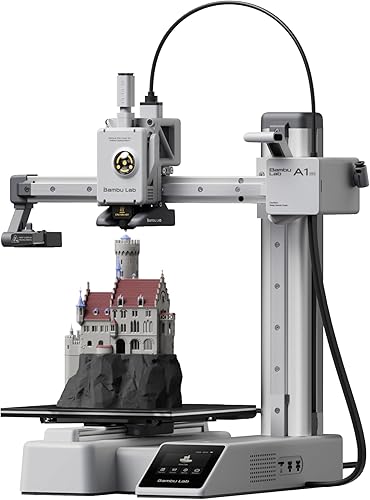
Key specs:
- 180x180x180mm build volume
- 500mm/s max speed
- AMS Lite compatible for 4-color printing (sold separately)
- Auto bed leveling, vibration compensation, and flow calibration
- Bambu Studio slicer with cloud printing
- Full-color touchscreen
Standout features:
- Print quality is in a different league compared to everything under $200. Benchmarks show the A1 Mini matching printers costing $500-700 on surface finish, dimensional accuracy, and overhang performance. The auto-calibration system handles the tuning that sub-$200 printers leave to the user.
- Bambu Studio is the best slicer bundled with any printer at any price. Pre-tuned profiles, one-click cloud printing, and the Bambu Handy app for monitoring create an experience that sub-$200 printers cannot replicate.
- Multi-color capability via AMS Lite ($99) is unavailable on any printer under $200. For $338 total, you get automatic 4-color printing — something that $600 printers from other brands cannot offer.
What could be better:
- The 180mm build volume is smaller than both the Ender-3 V3 SE and Neptune 4. Users who need to print larger objects will find the A1 Mini limiting.
- It costs $40-60 more than the sub-$200 options. For users on a strict budget, that gap matters.
- The Bambu ecosystem is proprietary and cloud-connected, which some users find restrictive.
Who should buy this: Anyone whose budget can stretch to $239. The A1 Mini is so much better than the sub-$200 options that skipping one restaurant meal to fund the upgrade is genuinely worth it. The best value per dollar in the entire 3D printing market.
Verdict: If you can afford $239, buy this instead of anything under $200. The gap in quality, reliability, and experience is the largest step-up per dollar in the entire 3D printer market.
The Reality of 3D Printing Under $200
The sub-$200 bracket deserves honest context. Here is what you should know before buying:
What you get: A functional 3D printer that can produce good results with PLA filament. Auto bed leveling (on the options above), reasonable build volume, and enough speed for hobby use. Both the Ender-3 V3 SE and Neptune 4 are genuinely capable machines.
What you give up compared to $239-400 printers:
- Print quality: Sub-$200 printers produce good prints but not great prints without manual tuning. The A1 Mini and Bambu A1 produce noticeably better surface finishes, cleaner overhangs, and tighter dimensional accuracy straight out of the box.
- Speed (on the V3 SE): 250mm/s vs. 500mm/s means prints take roughly twice as long. Over months of regular use, this is a significant time cost.
- Multi-color: Not available under $200. The A1 Mini with AMS Lite at $338 is the cheapest path to multi-color printing.
- Software polish: Slicer profiles require more manual adjustment. Cloud printing and remote monitoring are limited or absent.
- Reliability: Higher first-print failure rates and more frequent need for recalibration based on aggregated owner data.
The $239 sweet spot: The print community overwhelmingly recommends stretching to $239 for the Bambu A1 Mini if at all possible. The difference in experience between $179 and $239 is far larger than the difference between $239 and $399. If your budget is truly locked at $200, the Ender-3 V3 SE is a solid machine. But if there is any flexibility, the extra $40-60 delivers disproportionate returns.
How We Evaluated
Every printer in this roundup was evaluated using manufacturer specifications, aggregated owner reviews, community benchmarks, and comparative analysis. No products were personally tested. Key criteria for the sub-$200 bracket:
- Is it actually good? Under $200, this is the first question. Many budget printers look appealing on spec sheets but deliver poor real-world results. Only printers with broadly positive community feedback made this list.
- Auto bed leveling: Considered mandatory. Printers without it were excluded because manual leveling is the primary source of beginner frustration.
- Print quality vs. price: How close does the output come to printers costing $100-200 more?
- Reliability: First-print success rates and long-term consistency from aggregated owner reviews.
- Community support: Size and activity of user communities, availability of troubleshooting resources, and parts sourcing options.
FAQ
What is the best 3D printer under $200? The Creality Ender-3 V3 SE at $179 is the best printer strictly under $200. It offers auto bed leveling, a 220mm build volume, and the largest community support ecosystem. However, if you can stretch to $239, the Bambu Lab A1 Mini is dramatically better in every measurable way.
Is a $179 3D printer actually good? Yes — the Ender-3 V3 SE is a genuinely capable machine. It will not match the print quality or speed of $300+ printers, but it produces good PLA prints, has auto bed leveling, and is backed by the largest community in 3D printing. It is the minimum viable investment for good 3D printing.
Should I save up for a better printer instead? If you can wait, yes. Our 3D printer buying guide breaks down what you get at each price tier. The jump from $179 to $239 (Bambu A1 Mini) or $289 (Creality Ender-3 V3) delivers dramatically more capability per dollar. The $200-300 bracket offers printers that are genuinely fast (500-600mm/s), produce better quality, and include more modern features. Saving an extra $60-110 is one of the best investments a new 3D printer buyer can make.
What should I avoid under $200? Avoid any 3D printer without auto bed leveling, any brand without an established community presence, and any listing that seems too good to be true. The print community specifically warns against unbranded machines on Amazon that advertise impressive specs at $100-150 — these typically deliver poor print quality, unreliable hardware, and zero customer support.