Best 3D Printer Under $300 (2026) — Compared & Ranked
Under $300 is the sweet spot for 3D printing in 2026. This is the bracket where you get genuinely fast printers (500mm/s), auto bed leveling, modern slicer support, and print quality that would have been flagship-tier performance two years ago. You give up enclosures and CoreXY at this price (with rare exceptions), but for PLA and PETG printing, these limitations rarely matter.
After comparing specifications, owner data, and print community feedback across every sub-$300 option worth considering, these are the five best choices.
The top pick is the Bambu Lab A1 Mini — Check Price on Amazon. At $239, it delivers the best combination of print quality, speed, software ecosystem, and reliability. It is the printer the 3D printing community recommends more than any other under $300.
Quick Comparison
| 3D Printer | Price | Build Volume | Speed | Key Feature | Best For |
|---|---|---|---|---|---|
| Bambu Lab A1 Mini | $239 | 180x180x180mm | 500mm/s | AMS Lite multi-color | Best Overall Under $300 |
| Creality Ender-3 V3 | $289 | 220x220x250mm | 600mm/s | CoreXZ speed | Best Speed Under $300 |
| AnkerMake M5C | $299 | 220x220x250mm | 500mm/s | App-first experience | Most User-Friendly |
| Elegoo Neptune 4 Pro | $259 | 225x225x265mm | 500mm/s | Klipper firmware | Best Build Volume for Price |
| Sovol SV07 | $259 | 220x220x250mm | 500mm/s | Klipper + value | Best Klipper Budget |
1. Bambu Lab A1 Mini — Best Overall Under $300
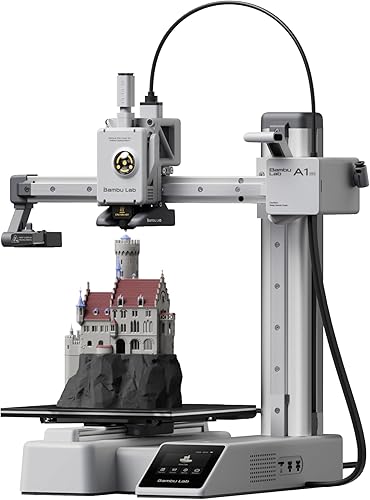
Why it’s #1: The Bambu Lab A1 Mini is the most recommended sub-$300 3D printer in the entire print community, and for good reason. It combines 500mm/s speed, automatic calibration, outstanding print quality, and the option for multi-color printing via AMS Lite — all at $239. Nothing else in this bracket matches the total package.
Key specs:
- 180x180x180mm build volume
- 500mm/s max speed with input shaping
- AMS Lite compatible for 4-color printing (sold separately, ~$99)
- Auto bed leveling, vibration compensation, and flow calibration
- Bambu Studio slicer with cloud printing
- Full-color touchscreen
Standout features:
- Print quality per dollar is unmatched. Benchmarks show the A1 Mini producing surface finishes and dimensional accuracy that compete with printers costing $500-700. The auto-tuning does the work that used to require hours of manual calibration.
- AMS Lite compatibility is unique in this price range. For $239 + $99, you get automatic 4-color printing — a capability that no other sub-$300 printer can offer at any price.
- The first-print experience sets the standard. Based on owner data, most users go from unboxing to a successful print in under 30 minutes with zero manual adjustment.
What could be better:
- The 180mm build volume is the smallest in this roundup. Users who want to print anything larger than roughly a smartphone-sized object will need to split models.
- Open frame with no enclosure option limits material choices to PLA, PETG, and TPU.
- Bambu’s proprietary ecosystem means firmware, cloud features, and slicer are all controlled by Bambu. Users who prefer open-source tools will find this restrictive.
Who should buy this: Anyone who wants the highest quality and most reliable 3D printing experience under $300. Beginners, hobbyists, miniature printers, and anyone prioritizing print quality over build volume.
Verdict: The best printer under $300, full stop. The A1 Mini’s combination of quality, speed, and ecosystem makes the $239 price point feel like a market anomaly.
2. Creality Ender-3 V3 — Best Speed Under $300
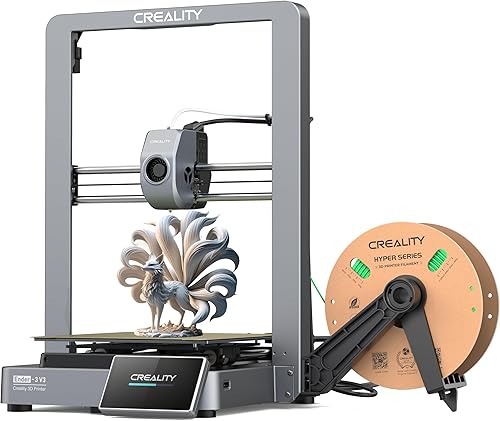
Why it ranks here: The Creality Ender-3 V3 brings CoreXZ architecture and 600mm/s advertised speed to the sub-$300 bracket at $289. It is the fastest printer under $300 on paper, and owner data confirms it produces quality results at speeds well above what traditional Ender-3 machines could achieve.
Key specs:
- 220x220x250mm build volume
- 600mm/s max speed with CoreXZ motion system
- Auto bed leveling
- Direct drive extruder
- Open frame design
- Klipper-based firmware
Standout features:
- The CoreXZ architecture is a meaningful upgrade over traditional bed-slinger Ender-3 designs. The bed only moves in Y while the print head handles X and Z, reducing print artifacts at high speeds. Based on community benchmarks, it holds quality at 300-400mm/s better than standard bed-slingers.
- 220x220x250mm build volume is 22% larger per axis than the A1 Mini. For functional prints, organizers, and medium-sized projects, this extra space eliminates the need to split models.
- The Ender-3 name carries the largest community ecosystem in 3D printing. Every question has been answered, every mod has been documented, and parts availability is unmatched.
What could be better:
- Print quality out of the box does not match the Bambu A1 Mini. Based on owner data, the Ender-3 V3 requires more slicer tuning to achieve its best results, particularly on overhangs and fine detail.
- No multi-color system available. The A1 Mini’s AMS Lite gives it a capability the Ender-3 V3 simply cannot match.
- Creality’s default slicer (Creality Print) is adequate but uninspiring. Most users switch to Cura or OrcaSlicer for better results.
Who should buy this: Users who want the fastest possible printer under $300 with a larger build volume than the A1 Mini. Ender-3 upgraders who want modern speed without changing ecosystems. Hobbyists who enjoy tuning and optimizing their setup.
Verdict: The fastest printer under $300 with a meaningful build volume advantage over the A1 Mini. It requires more tuning, but rewards that effort with speed and community support that no other sub-$300 printer matches.
3. AnkerMake M5C — Most User-Friendly Under $300
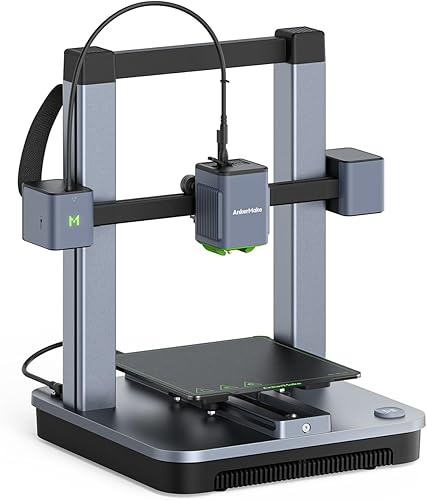
Why it ranks here: The M5C brings Anker’s consumer electronics approach to 3D printing — app-guided setup, clean design, and customer support that feels more like buying a phone charger than a maker tool. At $299, it sits at the top of this bracket but offers the friendliest experience for non-technical users.
Key specs:
- 220x220x250mm build volume
- 500mm/s max speed
- One-click auto-leveling
- AnkerMake app for setup, slicing, and monitoring
- Open frame design
- Magnetic PEI build plate
Standout features:
- The AnkerMake app provides a guided, step-by-step setup experience that genuinely reduces the intimidation factor. For users who set up smart speakers and robot vacuums via apps, this feels familiar rather than foreign.
- Anker’s warranty and customer support infrastructure is more accessible than specialist 3D printer brands. Based on owner data, return and replacement processes are smoother than average in the 3D printing industry.
- Build quality and fit-and-finish reflect Anker’s consumer electronics heritage. The M5C looks and feels like a product designed for living spaces, not a workshop.
What could be better:
- Print quality benchmarks place the M5C behind both the Bambu A1 Mini and the Creality Ender-3 V3. Fine detail, overhangs, and bridging performance are adequate but not class-leading.
- The AnkerMake slicer is limited compared to Bambu Studio, Cura, or PrusaSlicer. Advanced users will outgrow it quickly.
- At $299, it is the most expensive option in this roundup while offering lower print quality than the $239 A1 Mini. You are paying for the brand experience, not raw performance.
Who should buy this: Non-technical users entering 3D printing for the first time who value brand trust, app-driven setup, and accessible customer support over maximum print quality. Parents buying for older kids. Office environments exploring 3D printing.
Verdict: The most approachable 3D printer under $300 for users outside the maker community. It trades peak performance for an unmatched consumer experience.
4. Elegoo Neptune 4 Pro — Best Build Volume for the Price
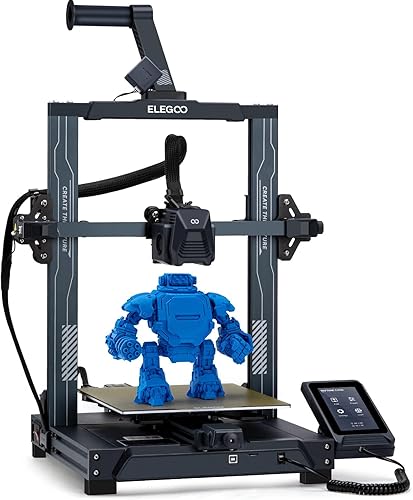
Why it ranks here: At $259, the Elegoo Neptune 4 Pro delivers 225x225x265mm of build volume with 500mm/s speed and Klipper firmware. It is the most printable space per dollar in this roundup, undercutting the identically-sized Creality and Anker options by $30-40.
Key specs:
- 225x225x265mm build volume
- 500mm/s max speed
- Klipper firmware with pressure advance and input shaping
- Auto bed leveling
- Direct drive extruder
- Open frame with PEI build plate
Standout features:
- The 225x225x265mm volume is the largest in this roundup, beating the Ender-3 V3 and M5C on all three dimensions. For users printing larger parts — enclosures, terrain pieces, or functional brackets — the extra space adds up.
- At $259, it costs $30 less than the Ender-3 V3 and $40 less than the M5C while offering more build volume than both. Pure specs-per-dollar, it is the best value in the bracket.
- Klipper firmware gives access to advanced features like pressure advance, input shaping, and macro support. For users who plan to learn and optimize, the ceiling is higher than with locked-down firmware.
What could be better:
- The out-of-box experience is rougher than the Bambu A1 Mini or AnkerMake M5C. Based on owner data, more initial tuning is required to achieve good print quality, particularly with first-layer adhesion and retraction settings.
- Elegoo’s slicer and community resources are less developed than Creality’s or Bambu’s. New users may feel less supported when troubleshooting.
- No multi-color system available, and the Elegoo ecosystem offers fewer accessories and upgrades than Bambu or Creality.
Who should buy this: Budget-conscious users who want the largest possible build volume under $300. Klipper enthusiasts who want a capable base machine for tuning and modifying. Users who prioritize raw value over polish.
Verdict: The best build volume per dollar under $300. It requires more tuning than premium options but rewards that effort with more printable space at a lower price.
5. Sovol SV07 — Best Budget Klipper Printer
Why it ranks here: The SV07 delivers Klipper firmware, 500mm/s speed, and a 220x220x250mm build volume at $259. For users who want a hackable, customizable platform that runs Klipper out of the box, the SV07 is the most affordable option that does it well.
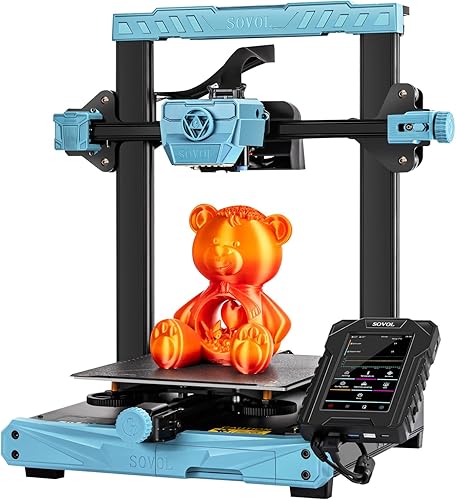
Key specs:
- 220x220x250mm build volume
- 500mm/s max speed
- Klipper firmware with web-based interface
- Auto bed leveling
- Direct drive extruder
- Open frame design
Standout features:
- Full Klipper with web-based Mainsail/Fluidd interface provides the most customizable firmware experience under $300. Users can tweak every parameter, write macros, and access the full Klipper ecosystem including remote monitoring via web browser.
- At $259, it matches the Neptune 4 Pro’s price while offering a more established Klipper implementation. Based on owner data, the web interface works reliably and provides a desktop-like monitoring experience without proprietary apps.
- The direct drive extruder handles flexible filaments (TPU) more reliably than Bowden-tube setups found on some budget printers. For users interested in printing phone cases, gaskets, and flexible parts, this matters.
What could be better:
- Build quality and component quality are a step below the Bambu, Creality, and AnkerMake options. Owner reviews occasionally note wobble, loose connections, and less-than-perfect assembly.
- Community resources are smaller than Creality’s or Bambu’s. Troubleshooting can require more independent problem-solving.
- No multi-color system, no enclosure, and limited first-party accessories. This is a base machine for tinkerers, not a polished ecosystem.
Who should buy this: Tinkerers and makers who want full Klipper access at the lowest possible price. Users who enjoy customizing and optimizing their printer. Anyone who values open firmware and a web-based interface over proprietary apps.
Verdict: The cheapest good Klipper printer available. It is not the most polished option in this bracket, but for users who want maximum control over their printing setup, the SV07 offers the most flexibility per dollar.
How We Evaluated
Every printer in this roundup was evaluated using manufacturer specifications, aggregated owner reviews, community benchmarks, and comparative analysis. No products were personally tested. Key criteria for the sub-$300 bracket:
- Print quality at this price: How close does the output come to printers costing $500+ based on community benchmarks and owner-shared results?
- Out-of-box experience: How much effort is required between unboxing and a successful first print?
- Speed vs. quality: Real-world usable speeds — not maximum advertised speeds — and the quality achievable at those speeds.
- Build volume per dollar: Raw printable space relative to cost.
- Ecosystem depth: Slicer quality, community size, parts availability, and upgrade paths.
- Reliability: First-print success rates and long-term consistency patterns from owner reviews.
FAQ
What is the best 3D printer under $300? The Bambu Lab A1 Mini at $239 is the best overall printer under $300. It offers the highest print quality, the best software ecosystem, and multi-color capability via AMS Lite. If you need more build volume, the Creality Ender-3 V3 at $289 or the Elegoo Neptune 4 Pro at $259 offer larger print areas.
Is $300 enough for a good 3D printer? Absolutely. The sub-$300 bracket includes printers with 500-600mm/s speeds, auto bed leveling, and print quality that matches $700+ machines from 2023. The main limitations at this price are the lack of enclosures (limiting material choices) and smaller build volumes compared to $400+ options.
Should I spend $239 on the A1 Mini or $289 on the Ender-3 V3? If print quality, ease of use, and multi-color potential are your priorities, the A1 Mini is the better choice. If you need a larger build volume (220mm vs 180mm) and want the fastest possible speeds, the Ender-3 V3 is worth the extra $50. Both are excellent options.
What else do I need to buy with a sub-$300 printer? A spool of PLA filament ($15-25) if one is not included, isopropyl alcohol for bed cleaning ($5), and optionally a set of nozzles ($10) and a scraper ($5). Total additional cost is typically $25-45 to start printing.