Best 3D Printer Under $500 (2026) — Compared & Ranked
The sub-$500 3D printer segment is the most competitive price bracket in the market right now. CoreXY motion systems, 500-600mm/s speeds, enclosed chambers, and multi-color capability have all dropped below the $500 threshold — features that cost $1,000+ just two years ago. The challenge is no longer finding a good printer at this price; it is choosing between several excellent options that each prioritize something different.
After comparing specifications, owner data, and print community feedback across every sub-$500 option worth considering, these are the five best choices.
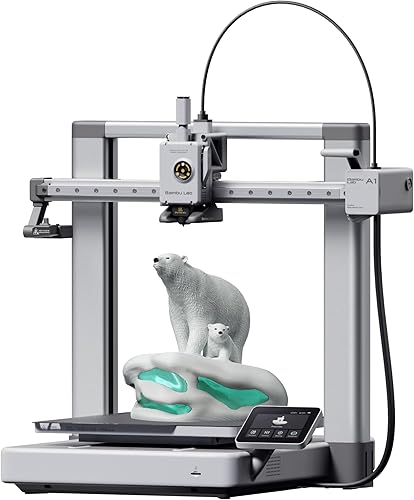
The top pick is the Bambu Lab A1 — Check Price on Amazon. At $399, it delivers 500mm/s speed, a full 256mm build volume, AMS Lite multi-color compatibility, and the most polished software ecosystem available. It is the most complete package under $500.
Quick Comparison
| 3D Printer | Price | Type | Build Volume | Speed | Enclosure | Best For |
|---|---|---|---|---|---|---|
| Bambu Lab A1 | $399 | FDM | 256x256x256mm | 500mm/s | Open | Best Overall Under $500 |
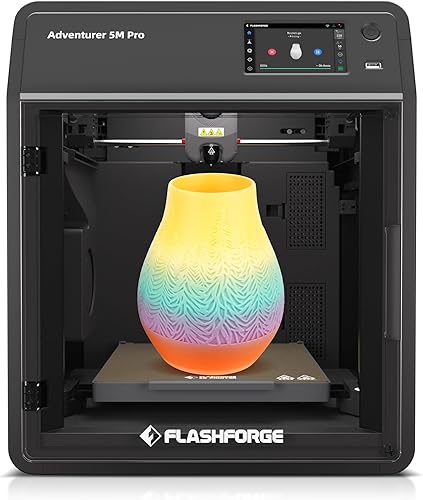
| Flashforge Adventurer 5M Pro | $449 | FDM CoreXY | 220x220x220mm | 600mm/s | Enclosed | Best Enclosed Under $500 |
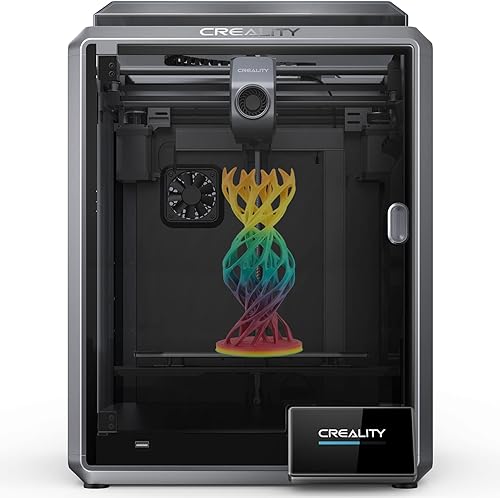
| Creality K1 | $399 | FDM CoreXY | 220x220x250mm | 600mm/s | Enclosed | Best CoreXY Value |
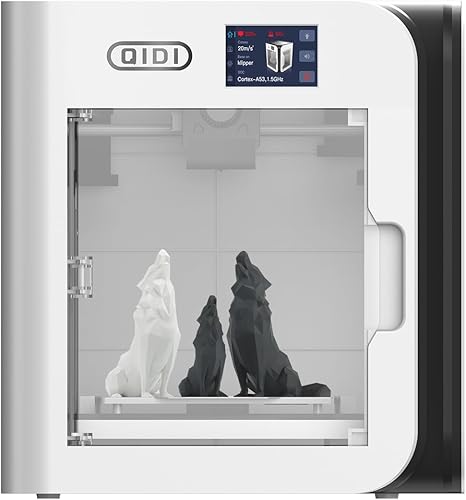
| QIDI X-Smart 3 | $379 | FDM CoreXY | 175x180x170mm | 500mm/s | Enclosed | Best Compact Enclosed |
| Elegoo Neptune 4 Plus | $350 | FDM | 320x320x385mm | 500mm/s | Open | Best Large Format Under $500 |
1. Bambu Lab A1 — Best Overall 3D Printer Under $500
Why it’s #1: The A1 combines Bambu’s plug-and-play reliability with a full-size 256mm build volume and 500mm/s speed at $399. Add AMS Lite for under $500 total and you have multi-color printing that rivals setups costing twice as much. No other sub-$500 printer matches this breadth of capability.
Key specs:
- 256x256x256mm build volume — the largest in this roundup
- 500mm/s max speed with input shaping and vibration compensation
- AMS Lite compatible for up to 4-color prints (AMS Lite ~$99 extra)
- Auto bed leveling, flow calibration, and pressure advance
- Bambu Studio slicer with cloud printing and remote monitoring
- Full-color touchscreen interface
Standout features:
- The 256mm build volume is the standout specification. At $399, no other printer offers this much printable space with comparable speed and quality. The Creality K1 and Flashforge 5M Pro both top out around 220mm.
- AMS Lite support means the A1 can print in up to 4 colors automatically. The print community showcases multi-color prints off the A1 that are genuinely impressive — logos, figurines, and functional parts with colored accents, all without manual filament swaps.
- Bambu’s ecosystem advantage is real. Based on owner data, the slicer profiles are dialed in, cloud printing works reliably, and firmware updates consistently improve performance. This level of software polish is unmatched under $500.
What could be better:
- Open frame limits material compatibility. ABS, ASA, and nylon will warp without a DIY enclosure or aftermarket solution.
- It is a bed-slinger design. Compared to CoreXY machines like the Creality K1, tall prints at high speed may show more visible artifacts due to bed mass oscillation.
- Bambu’s closed ecosystem may frustrate tinkerers who want full firmware control.
Who should buy this: Anyone who wants the most capable overall printer under $500 — whether for hobby printing, functional parts, or multi-color projects. The best choice for users who prioritize build volume, print quality, and software experience.
Verdict: The best sub-$500 printer by a clear margin. The A1’s combination of build volume, speed, multi-color support, and Bambu’s ecosystem makes every other option in this bracket a trade-off.
2. Flashforge Adventurer 5M Pro — Best Enclosed Printer Under $500
Why it ranks here: The 5M Pro is the only printer under $500 that combines CoreXY speed (600mm/s), a fully enclosed chamber, and a HEPA air filter. For users printing in living spaces or needing ABS capability, the enclosure is not a luxury — it is a necessity.
Key specs:
- CoreXY motion system at 600mm/s max speed
- 220x220x220mm build volume
- Fully enclosed chamber with HEPA air filter
- Quick-swap nozzle system — tool-free nozzle changes in seconds
- Auto bed leveling
- Klipper firmware
Standout features:
- The HEPA filter is a genuine safety feature for indoor printing. It captures ultrafine particles generated during printing, particularly with ABS and ASA. For users printing in bedrooms, offices, or near children, this is not optional — it is essential.
- The enclosed chamber enables reliable printing with ABS, ASA, PETG, and other temperature-sensitive materials that warp on open-frame printers. Based on owner data, first-attempt ABS success rates are significantly higher than on open-frame competitors.
- Quick-swap nozzles reduce one of the most common maintenance headaches to a 30-second operation. Swap between 0.4mm detail nozzles and 0.6mm speed nozzles without tools.
What could be better:
- The 220mm build volume is smaller than the Bambu A1’s 256mm, and $50 more expensive. You are paying for the enclosure and HEPA filter.
- Flashforge’s software ecosystem is less polished than Bambu’s. FlashPrint works but does not match Bambu Studio’s profile accuracy or user experience.
- No multi-color system available. The Bambu A1 with AMS Lite offers capabilities the 5M Pro cannot match.
Who should buy this: Users who need an enclosed printer for indoor use, anyone planning to print ABS or engineering filaments, parents printing near children, and users who want HEPA-filtered air quality. The best sub-$500 option for safety-conscious buyers.
Verdict: The only enclosed printer under $500 with CoreXY speed and HEPA filtration. If you need an enclosure, this is the one to buy.
3. Creality K1 — Best CoreXY Value Under $500
Why it ranks here: The K1 delivers enclosed CoreXY printing at 600mm/s for $399 — the same price as the open-frame Bambu A1. For users who want an enclosed CoreXY machine and do not need multi-color, the K1 offers more printer architecture per dollar than anything else in this bracket.
Key specs:
- CoreXY motion system at 600mm/s max speed
- 220x220x250mm build volume
- Fully enclosed chamber
- Auto bed leveling, input shaping, and pressure advance
- Klipper firmware
- Built-in AI camera for print monitoring
Standout features:
- Enclosed CoreXY at $399 is remarkable value. The closest Bambu equivalent — the Bambu Lab P1S — costs $699. While the K1 does not match the P1S on software polish, the hardware architecture is comparable.
- 600mm/s advertised speed with real-world performance that owner data places at 300-400mm/s with good quality. That is still fast enough to cut print times in half compared to 200mm/s machines.
- The built-in AI camera monitors prints for failures. Based on owner reviews, it catches spaghetti failures and detachment issues, saving hours of wasted filament.
What could be better:
- Print quality requires more tuning than the Bambu A1 out of the box. The print community reports good results after dialing in settings, but the first-print experience is not as seamless.
- Creality’s slicer and cloud platform are weaker than Bambu’s. Most users end up using Cura or OrcaSlicer for better results.
- The 220mm build volume is smaller than the Bambu A1’s 256mm. If enclosure is not critical, the A1 gives you more space.
Who should buy this: Users who specifically want an enclosed CoreXY printer without spending $700+ on a Bambu P1S. Hobbyists comfortable with some slicer tuning who prioritize the architectural advantages of CoreXY and an enclosed chamber.
Verdict: The cheapest enclosed CoreXY printer worth buying. It trades software polish for hardware value, making it the best choice for users who prioritize the enclosure over the ecosystem.
4. QIDI X-Smart 3 — Best Compact Enclosed Under $500
Why it ranks here: The X-Smart 3 packs CoreXY speed, a fully enclosed chamber, and a heated build plate into the most compact form factor in this roundup — all for $379. For users with limited desk space who still want enclosed printing capability, it is the only real option.
Key specs:
- CoreXY motion system at 500mm/s max speed
- 175x180x170mm build volume
- Fully enclosed chamber
- Auto bed leveling
- Klipper firmware
- 4.3-inch touchscreen
Standout features:
- The compact enclosed design fits on desks, shelves, and in spaces where larger enclosed printers simply will not go. Based on owner data, the small footprint makes it practical for dorm rooms, small apartments, and shared workspaces.
- At $379, it undercuts both the Creality K1 ($399) and the Flashforge 5M Pro ($449) while still offering enclosed CoreXY capability. For users who do not need a large build volume, this is the most affordable enclosed CoreXY available.
- QIDI’s build quality receives consistently positive reviews. The print community reports solid construction, reliable performance, and good first-print results.
What could be better:
- The 175x180x170mm build volume is the smallest in this roundup — even smaller than the Bambu Lab A1 Mini. This severely limits what you can print in a single piece.
- QIDI’s software ecosystem is less developed than Bambu’s or Creality’s. Community resources and slicer profiles are not as abundant.
- No multi-color system available.
Who should buy this: Users with limited space who need enclosed printing, hobbyists who primarily print small parts and miniatures, and anyone who wants a compact CoreXY machine at the lowest possible price.
Verdict: The most space-efficient enclosed CoreXY printer available. Ideal for small workspaces and small-part printing, though the limited build volume will feel restrictive for larger projects.
5. Elegoo Neptune 4 Plus — Best Large Format Under $500
Why it ranks here: The Neptune 4 Plus offers a massive 320x320x385mm build volume at just $350 — by far the most printable space per dollar in this roundup. For users who need to print large parts without splitting models, nothing else under $500 comes close to this volume.
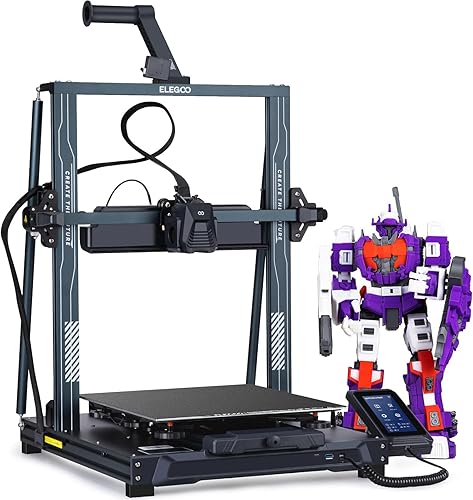
Key specs:
- 320x320x385mm build volume — the largest under $500
- 500mm/s max speed
- Klipper firmware with pressure advance and input shaping
- Auto bed leveling
- Open frame design
- PEI spring steel build plate
Standout features:
- The build volume is the obvious headline. At 320x320x385mm, the Neptune 4 Plus can print objects that would require splitting across 2-3 prints on a 220mm or 256mm machine. For cosplay pieces, terrain, large vases, and functional enclosures, this is transformative.
- At $350, the cost per cubic millimeter of build volume is unmatched. The Creality K1 Max offers a similar 300mm build volume but costs $687 — nearly double the price (and the Neptune 4 Plus is still larger).
- Klipper firmware with input shaping and pressure advance means the Neptune 4 Plus can hit 300-400mm/s real-world speeds with acceptable quality based on owner reports.
What could be better:
- Open frame means no ABS or ASA without a DIY enclosure — a significant limitation on a printer this size.
- Print quality at high speeds does not match Bambu or Creality K-series machines based on community benchmarks. Fine detail and surface finish require slower speeds and more slicer tuning.
- Elegoo’s software and customer support are less polished than competitors. The print community recommends using OrcaSlicer or Cura instead of Elegoo’s default slicer.
Who should buy this: Users who need the largest possible build volume on a budget — cosplayers, prop makers, terrain builders, and anyone who regularly prints large functional parts. Not the best choice for fine detail or small parts.
Verdict: The most build volume you can buy under $500. It trades polish and enclosure for sheer size, making it the obvious choice when large-format printing is the priority.
How We Evaluated
Every printer in this roundup was evaluated using manufacturer specifications, aggregated owner reviews, community benchmarks, and comparative analysis. No products were personally tested. Key criteria for the sub-$500 bracket:
- Value: What you get for every dollar spent — build volume, speed, features, and included accessories.
- Print quality: Dimensional accuracy and surface finish at real-world speeds, not maximum theoretical speeds.
- Reliability: First-print success rates and long-term consistency based on patterns across hundreds of owner reviews.
- Feature set: Enclosure, multi-color support, auto-leveling, and input shaping — what is included versus what costs extra.
- Software ecosystem: Slicer quality, firmware update frequency, and availability of community-tuned profiles.
- Material compatibility: Range of printable filaments, with extra weight given to printers that reliably handle engineering materials.
FAQ
What is the best 3D printer under $500? The Bambu Lab A1 at $399 is the best overall printer under $500. It offers the largest build volume (256mm), 500mm/s speed, AMS Lite multi-color support, and the most polished software ecosystem. If you need an enclosed printer, the Flashforge Adventurer 5M Pro at $449 is the best enclosed option under $500.
Is a CoreXY printer better than a bed-slinger? CoreXY printers move the print head on both X and Y axes while the bed only moves in Z. This produces cleaner prints at high speeds because the heavy bed is not accelerating back and forth. For speeds above 300mm/s, CoreXY is noticeably better. Under 200mm/s, the difference is minimal.
Do I need an enclosed 3D printer? If you only print PLA and PETG, no. Open-frame printers handle these materials well. If you plan to print ABS, ASA, nylon, or polycarbonate, an enclosure dramatically improves success rates by maintaining consistent chamber temperature. Enclosures also reduce noise and contain any fumes.
Can a $400 printer produce professional-quality prints? Yes. Modern $400 printers like the Bambu A1 and Creality K1 produce print quality that matches machines costing $1,000+ from just a few years ago. The main limitations at this price are material compatibility (due to open frames) and multi-color capability (which requires add-on hardware).
What hidden costs should I expect? Budget $20-30 for your first few spools of PLA filament, $5-10 for isopropyl alcohol and a scraper, and potentially $99-249 for a multi-color system if you want that capability. Most printers include everything else needed to start printing.