Best 3D Printer for Beginners (2026) — Easy Setup, Great Results
Buying a first 3D printer used to mean accepting a steep learning curve — manual bed leveling, firmware tweaks, slicer trial-and-error, and a pile of failed prints before anything usable came off the build plate. That era is over. The best beginner printers in 2026 work out of the box, auto-calibrate themselves, and produce quality that would have required expert-level tuning just two years ago.
The key for beginners is not just price — it is the full experience: unboxing to first successful print, software that does not require a YouTube tutorial, and a machine that reliably produces good results without constant intervention.
The top pick is the Bambu Lab A1 Mini — Check Price on Amazon. At $239, it delivers 500mm/s speed, automatic calibration, excellent print quality, and Bambu’s beginner-friendly slicer. Based on owner data, most users complete their first print within 30 minutes of unboxing. But depending on your budget and priorities, one of these five options might be the better fit.
Quick Comparison
| 3D Printer | Price | Build Volume | Speed | Setup Time | Best For |
|---|---|---|---|---|---|
| Bambu Lab A1 Mini | $239 | 180x180x180mm | 500mm/s | ~15 min | Best Overall Beginner |
| Creality Ender-3 V3 SE | $179 | 220x220x250mm | 250mm/s | ~30 min | Cheapest Good Printer |
| Bambu Lab A1 | $399 | 256x256x256mm | 500mm/s | ~15 min | Best Step-Up |
| AnkerMake M5C | $299 | 220x220x250mm | 500mm/s | ~20 min | Most Consumer-Friendly |
| Flashforge Adventurer 5M | $299 | 220x220x220mm | 600mm/s | ~10 min | Easiest Enclosed |
1. Bambu Lab A1 Mini — Best Overall Beginner 3D Printer
Why it’s #1: The Bambu Lab A1 Mini removes virtually every obstacle that makes 3D printing frustrating for beginners. Automatic bed leveling, vibration compensation, pre-tuned slicer profiles, and a touchscreen interface mean there is almost nothing to configure. The print community consistently recommends it as the single best first printer available.
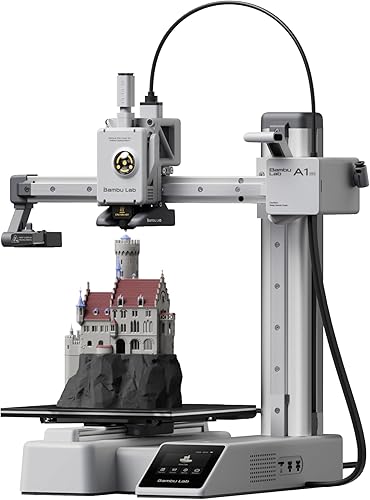
Key specs:
- 180x180x180mm build volume
- 500mm/s max print speed
- Auto bed leveling, vibration compensation, and flow calibration
- AMS Lite compatible for multi-color prints (sold separately)
- Full-color touchscreen
- Bambu Studio slicer with cloud printing
Standout features:
- The first-print success rate is the A1 Mini’s strongest selling point. Owner data across thousands of reviews shows an extraordinarily high rate of successful first prints with zero manual calibration. For beginners, this is the difference between excitement and frustration.
- Bambu Studio is the most beginner-friendly slicer paired with any printer. It includes pre-configured profiles for every Bambu filament, one-click cloud printing, and real-time monitoring via the Bambu Handy app.
- At 500mm/s, prints finish fast. A phone stand that takes 3 hours on a 250mm/s printer finishes in under 90 minutes. For impatient beginners, speed matters.
What could be better:
- The 180mm build volume is limiting. Beginners who catch the printing bug quickly want to print larger objects, and the A1 Mini will feel small within a few months.
- Open frame means ABS and temperature-sensitive filaments are unreliable. Beginners should stick to PLA and PETG.
- Bambu’s cloud-connected ecosystem requires an account and internet connection for some features, which some users find intrusive.
Who should buy this: First-time 3D printer owners who want the smoothest possible entry into the hobby. Students, kids (with supervision), hobbyists testing the waters, and anyone who values ease of use above all else.
Verdict: The single best first 3D printer. The A1 Mini makes 3D printing feel as simple as a regular desktop printer — unbox, load filament, and print.
2. Creality Ender-3 V3 SE — Cheapest Good 3D Printer
Why it ranks here: At $179, the Ender-3 V3 SE is the cheapest 3D printer that the print community actually recommends. It includes auto bed leveling, a direct drive extruder, and 250mm/s speed — features that used to cost $400+. Below $179, quality drops off a cliff.
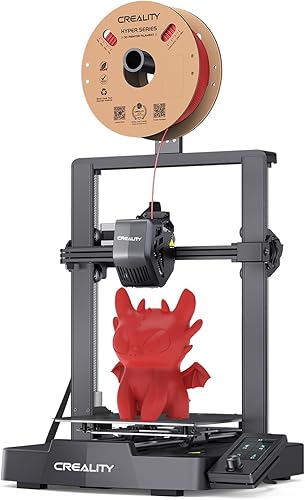
Key specs:
- 220x220x250mm build volume — larger than the A1 Mini
- 250mm/s max speed
- Auto bed leveling with CR Touch
- Direct drive extruder for better filament control
- Open frame design
- PEI spring steel build plate
Standout features:
- The 220x220x250mm build volume is significantly larger than the A1 Mini’s 180mm cube. For beginners who want to print functional items — phone holders, organizers, cosplay parts — the extra space matters immediately.
- At $179, it costs $60 less than the A1 Mini. For budget-conscious buyers, that gap buys several rolls of filament.
- The massive Ender-3 community means every possible question has been answered somewhere. Troubleshooting resources, mod guides, and printable upgrade parts are abundant.
What could be better:
- 250mm/s is noticeably slower than the 500mm/s offered by the A1 Mini and other modern printers. Prints take roughly twice as long at comparable quality.
- Setup requires more effort than the A1 Mini. Based on owner data, expect 20-30 minutes of assembly and initial calibration.
- Creality’s slicer (Creality Print) is functional but less polished than Bambu Studio. Most experienced users recommend switching to Cura or PrusaSlicer.
Who should buy this: Budget-conscious beginners who want the largest possible build volume under $200, users who do not mind slightly slower prints, and anyone comfortable with a modest learning curve in exchange for saving money.
Verdict: The best value in absolute terms. The Ender-3 V3 SE proves that good 3D printing no longer requires a $300+ investment, even if the A1 Mini offers a smoother experience for $60 more.
3. Bambu Lab A1 — Best Step-Up Beginner Printer
Why it ranks here: The A1 is the answer to “I want the A1 Mini experience but bigger.” It delivers the same plug-and-play simplicity, 500mm/s speed, and Bambu ecosystem with a full 256x256x256mm build volume. For beginners who know they will want to print larger objects, starting here avoids an upgrade within six months.
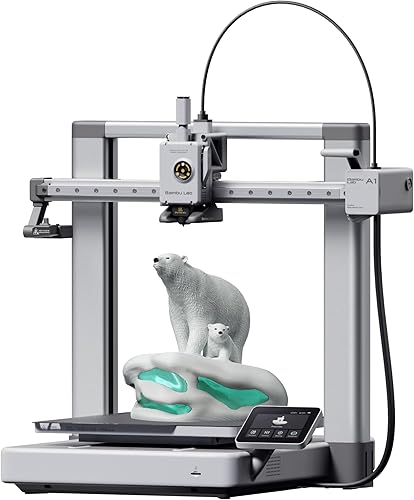
Key specs:
- 256x256x256mm build volume — same as the Bambu P1S
- 500mm/s max speed
- AMS Lite compatible for multi-color prints
- Auto bed leveling, vibration compensation, flow calibration
- Full-color touchscreen
- Bambu Studio slicer with cloud connectivity
Standout features:
- The full 256mm build volume handles the vast majority of hobby projects without splitting models across multiple prints. Helmets, large figurines, and functional enclosures print in one piece.
- Same Bambu plug-and-play experience as the A1 Mini. Based on owner data, the first-print success rate is equally high. No calibration learning curve.
- AMS Lite compatibility at $399 means multi-color printing is accessible without jumping to the $699 P1S. The total cost with AMS Lite is still under $500.
What could be better:
- At $399, the price gap over the $239 A1 Mini is significant. Beginners uncertain about their commitment may prefer to start smaller.
- Open frame limits material options — same restriction as the A1 Mini. No enclosed chamber for ABS or ASA.
- It is a bed-slinger design, which can produce visible artifacts on tall, narrow prints at high speeds compared to CoreXY machines.
Who should buy this: Beginners who are confident they will stick with the hobby and want room to grow. Users who already know they want to print larger objects. Anyone who wants the A1 Mini experience without the size compromise.
Verdict: The best beginner printer for users who want to skip the “I wish I’d bought something bigger” phase. All the ease of the A1 Mini with a build volume that will stay relevant for years.
4. AnkerMake M5C — Most Consumer-Friendly 3D Printer
Why it ranks here: Anker designed the M5C for people who have never thought about 3D printers before. The app-first setup, consumer-grade packaging, and familiar Anker brand experience make it the least intimidating entry point for complete newcomers who are not already embedded in the 3D printing community.
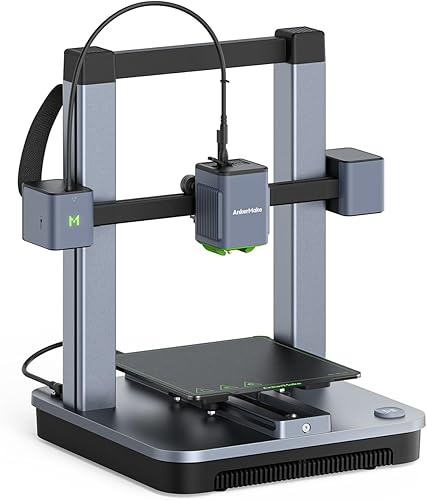
Key specs:
- 220x220x250mm build volume
- 500mm/s max speed
- One-click auto-leveling
- AnkerMake app for setup, slicing, and monitoring
- Open frame design
- Magnetic PEI build plate
Standout features:
- The AnkerMake app provides a guided setup experience that feels more like setting up a smart home device than a 3D printer. For users who are comfortable with apps but intimidated by slicer software, this is a meaningful differentiator.
- Anker’s customer support and return policy are more consumer-friendly than specialist 3D printer brands. For beginners worried about getting stuck, this safety net matters.
- 500mm/s speed at $299 is competitive. Based on owner data, real-world speeds of 250-350mm/s at good quality match more expensive competitors.
What could be better:
- Print quality does not match the Bambu A1 Mini based on community benchmarks, particularly on fine detail and overhangs.
- The AnkerMake slicer is less feature-rich than Bambu Studio, Cura, or PrusaSlicer. Advanced users will want to switch quickly.
- Open frame with no multi-color system available. Material and color options are more limited than AMS-compatible printers.
Who should buy this: Non-technical users who want a 3D printer that feels like a consumer electronics product rather than a maker tool. Anyone who values Anker’s brand trust, customer support, and app-driven experience.
Verdict: The friendliest 3D printer for people outside the maker community. It trades some print quality and features for an approachability that no other brand matches.
5. Flashforge Adventurer 5M — Easiest Enclosed Beginner Printer
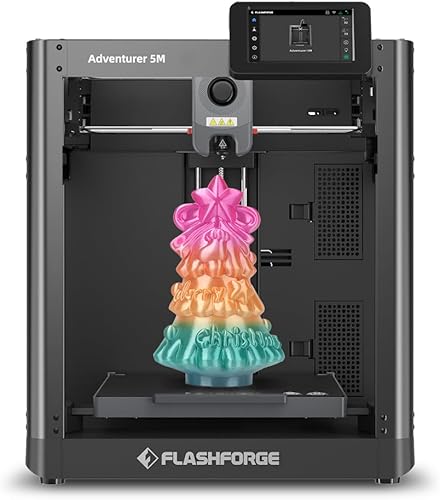
Why it ranks here: The Adventurer 5M is the only sub-$300 printer on this list with a CoreXY motion system and 600mm/s speed. Its quick-swap nozzle system and straightforward interface make it an appealing option for beginners who want speed and convenience without entering Bambu’s ecosystem.
Key specs:
- CoreXY motion system at 600mm/s max speed
- 220x220x220mm build volume
- Quick-swap nozzle system — change nozzles in seconds without tools
- Auto bed leveling
- Open frame design (the Pro model at $449 adds an enclosure and HEPA filter)
- Klipper firmware
Standout features:
- The quick-swap nozzle is a standout feature for beginners. Nozzle clogs are one of the most common beginner frustrations, and being able to swap in 30 seconds without tools eliminates most of that frustration.
- CoreXY at $299 is the most affordable CoreXY option available. The motion system produces cleaner prints at high speeds compared to bed-slinger designs.
- 600mm/s advertised speed makes it the fastest printer in this beginner roundup on paper. Owner data suggests 300-400mm/s at usable quality, which is still very fast.
What could be better:
- Flashforge’s software ecosystem is the weakest in this roundup. FlashPrint works but lacks the polish and community support of Bambu Studio or PrusaSlicer.
- Reliability data from the print community is mixed. Some owners report excellent results; others note inconsistencies with bed adhesion and first-layer calibration.
- The open-frame 5M lacks the enclosure — upgrading to the enclosed 5M Pro ($449) significantly increases the price.
Who should buy this: Beginners who prioritize speed and want a CoreXY architecture at the lowest possible price. Users who plan to experiment with different nozzle sizes regularly. Anyone who wants an alternative to the Bambu ecosystem.
Verdict: The fastest beginner-friendly printer at this price. The quick-swap nozzle and CoreXY architecture offer genuine advantages, though the software experience does not match Bambu’s polish.
How We Evaluated
Every printer in this roundup was evaluated specifically for the beginner experience — not just raw specs, but the full journey from unboxing to consistent successful prints. We used manufacturer specifications, owner reviews, community feedback, and beginner-focused benchmark data. No products were personally tested. Key criteria:
- Setup difficulty: Time from unboxing to first print, number of manual steps required, and clarity of instructions.
- First-print success rate: Based on aggregated owner reviews — how often does the included test file or a basic model print successfully without intervention?
- Software experience: Slicer quality for new users, availability of pre-configured profiles, and quality of guided setup.
- Learning curve: How much 3D printing knowledge is required before producing good results consistently?
- Community support: Availability of beginner tutorials, troubleshooting guides, and active community forums.
- Value: Cost of the printer plus essential accessories (filament, tools, upgrades) needed to start printing successfully.
FAQ
What is the best 3D printer for a complete beginner? The Bambu Lab A1 Mini at $239 is the best first 3D printer for most beginners. It offers automatic calibration, a beginner-friendly slicer, fast print speeds, and the highest first-print success rate of any printer in its price range. If $239 is too much, the Creality Ender-3 V3 SE at $179 is the cheapest genuinely good option.
How hard is 3D printing to learn? If you are still deciding whether to take the plunge, see is a 3D printer worth it for a full breakdown. With modern printers like the Bambu A1 Mini or AnkerMake M5C, the printing itself is straightforward — load filament, select a model, and press print. The learning curve now lives in design (learning CAD software) and understanding when to adjust settings like layer height, infill, and supports. Most beginners produce successful prints within their first session.
What filament should beginners use? PLA (polylactic acid) is the universal recommendation for beginners. It prints at lower temperatures, does not require an enclosure, produces minimal odor, and is the most forgiving material available. PETG is a good step-up when you want more durability and heat resistance.
Do I need an enclosed 3D printer as a beginner? Not for PLA and PETG, which are the materials beginners should start with. Enclosures become important when printing ABS, ASA, nylon, and other engineering materials that warp in open air. If you think you will want to print those materials eventually, consider the Flashforge Adventurer 5M Pro ($449) or save for the Bambu Lab P1S ($699).
How much does filament cost? Standard PLA filament costs $15-25 per 1kg spool. A single spool prints dozens of small to medium objects. Most beginners spend $50-100 on filament in their first year. Specialty filaments (carbon fiber, flexible TPU, silk) cost $25-40 per spool.