Best 3D Printer (2026) — Compared & Ranked
The 3D printer market in 2026 is unrecognizable from even two years ago. Speed has gone from a premium feature to a baseline expectation, enclosed chambers are available under $700, and multi-color printing no longer requires hours of manual filament swaps. Whether you are printing functional parts, miniatures, or prototypes, the hardware available today is faster, more reliable, and cheaper than it has ever been.
After comparing specifications, owner data, print community feedback, and real-world results across every major brand, these are the five best 3D printers you can buy right now.
The top pick is the Bambu Lab P1S — Check Price on Amazon. An enclosed CoreXY printer running at 500mm/s with AMS multi-color compatibility, auto bed leveling, and Bambu’s refined software ecosystem for $699. It delivers print quality and speed that rivaled $2,000+ machines just 18 months ago. But the best printer for you depends on what you are printing, so here are five picks covering different priorities.
Quick Comparison
| 3D Printer | Price | Type | Build Volume | Speed | Enclosure | Best For |
|---|---|---|---|---|---|---|
| Bambu Lab P1S | $699 | FDM CoreXY | 256x256x256mm | 500mm/s | Enclosed | Best Overall |
| Bambu Lab A1 Mini | $239 | FDM | 180x180x180mm | 500mm/s | Open | Best Budget |
| Creality K1 Max | $687 | FDM CoreXY | 300x300x300mm | 600mm/s | Enclosed | Best Large Format |
| Prusa MK4S Kit | $799 | FDM | 250x210x220mm | 200mm/s | Optional | Best Open-Source |
| Elegoo Saturn 3 Ultra | $349 | MSLA Resin | 219x123x260mm | 150mm/h | Enclosed | Best Resin |
1. Bambu Lab P1S — Best Overall 3D Printer
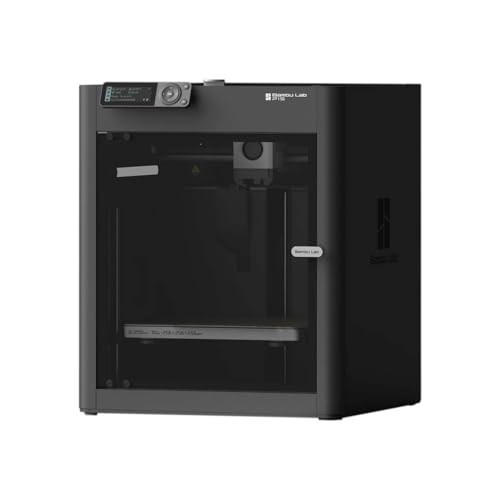
Why it’s #1: The Bambu Lab P1S hits the best balance of speed, print quality, reliability, and price in 2026. It runs a CoreXY motion system at 500mm/s inside a fully enclosed chamber, supports multi-color printing via the AMS system, and works out of the box with minimal calibration. At $699, nothing else offers this combination.
Key specs:
- CoreXY motion system with 500mm/s max speed and 20,000mm/s acceleration
- 256x256x256mm build volume — large enough for most projects
- Fully enclosed chamber for ABS, ASA, and other temperature-sensitive filaments
- Compatible with the Bambu AMS (Automatic Material System) for up to 16-color prints
- Auto bed leveling, vibration compensation, and flow calibration
- Bambu Studio slicer with cloud printing and remote monitoring
Standout features:
- The out-of-box experience is what sets Bambu apart. Owner data consistently shows first prints completing successfully within 30 minutes of unboxing. No manual leveling, no PID tuning, no firmware flashing.
- The enclosed chamber is a genuine differentiator at this price. It enables reliable ABS and ASA printing — materials that warp badly on open-frame printers. The print community reports consistent success with engineering filaments that used to require $1,500+ machines.
- AMS compatibility turns the P1S into a multi-color powerhouse. The system automatically loads and purges filaments, enabling multi-material prints that would be impossible on manual-swap setups.
What could be better:
- The AMS unit is sold separately ($249), pushing the true multi-color cost to around $950. The P1S Combo ($899) includes it.
- Bambu’s ecosystem is proprietary. The slicer, cloud platform, and firmware are closed-source, which frustrates users who prefer full control.
- The 256mm build volume, while generous, is outpaced by the Creality K1 Max’s 300mm cube.
Who should buy this: Anyone who wants the best all-around FDM printer without compromise. Ideal for hobbyists, designers, small businesses, and anyone who values reliability and speed over tinkering.
Verdict: The single best FDM 3D printer for most people. The P1S delivers enclosed CoreXY performance, multi-color capability, and Bambu’s plug-and-play ecosystem at a price that makes everything else feel like a trade-off.
2. Bambu Lab A1 Mini — Best Budget 3D Printer
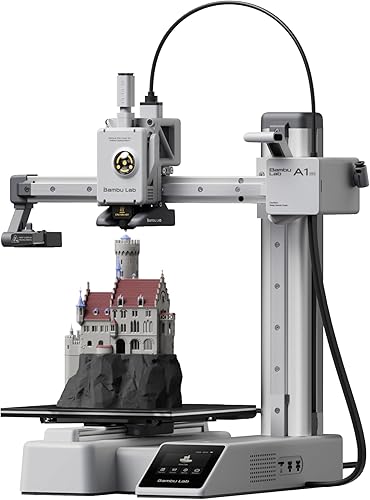
Why it ranks here: At $239, the Bambu Lab A1 Mini delivers 500mm/s print speed, exceptional print quality, and Bambu’s slicer ecosystem in the most affordable package the brand offers. It punches far above its price class.
Key specs:
- 180x180x180mm build volume
- 500mm/s max speed with input shaping
- AMS Lite compatible for 4-color prints
- Auto bed leveling and vibration compensation
- Open-frame design
- Full-color touchscreen interface
Standout features:
- Print quality at this price point is remarkable. Benchmarks show the A1 Mini matching or exceeding printers costing twice as much on dimensional accuracy and surface finish.
- AMS Lite compatibility means multi-color printing is available even on a sub-$300 printer. The print community regularly showcases A1 Mini multi-color prints that are indistinguishable from those off machines five times the price.
- Setup takes under 15 minutes. Based on owner data, this is the closest thing to “plug and print” in the budget segment.
What could be better:
- The 180mm build volume limits project size significantly. Helmets, large cosplay pieces, and functional enclosures will need to be split across multiple prints.
- No enclosure means ABS and ASA are unreliable without a DIY solution.
- The AMS Lite is an additional $99 purchase.
Who should buy this: First-time 3D printer owners, students, hobbyists with limited desk space, and anyone who wants excellent print quality without a large upfront investment.
Verdict: The best entry point into 3D printing. Nothing else at $239 comes close to the A1 Mini’s combination of speed, quality, and ease of use.
3. Creality K1 Max — Best Large Format 3D Printer
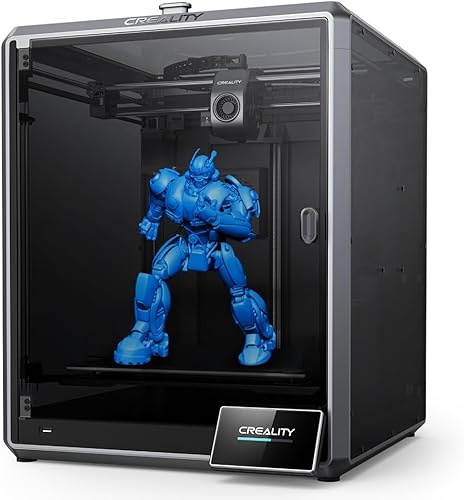
Why it ranks here: The Creality K1 Max delivers 300x300x300mm of enclosed build volume at 600mm/s for $687. For large functional parts, batch printing, and projects that simply do not fit on a 256mm bed, it is the best value in the large-format enclosed segment.
Key specs:
- CoreXY motion system at 600mm/s max speed
- 300x300x300mm build volume — significantly larger than the Bambu P1S
- Fully enclosed chamber
- AI camera for print monitoring and timelapse
- Auto bed leveling, input shaping, and pressure advance
- Klipper firmware with Creality’s custom interface
Standout features:
- The 300mm build volume is 37% larger per axis than the Bambu P1S’s 256mm. In practical terms, that is roughly 60% more printable volume — a meaningful difference for large functional parts, terrain pieces, and batch production.
- 600mm/s advertised speed with Klipper firmware under the hood. Owner data suggests real-world cruising speeds around 300-400mm/s with good quality, which still makes it one of the fastest large-format options available.
- The AI camera detects print failures automatically and can pause the job, saving hours of wasted filament on long prints.
What could be better:
- Print quality out of the box does not match the Bambu P1S. Owner reviews report more fine-tuning is needed to achieve comparable surface finish, particularly at higher speeds.
- Creality’s software ecosystem is less polished than Bambu’s. The slicer and cloud platform receive mixed reviews from the print community.
- No native multi-color system equivalent to Bambu’s AMS.
Who should buy this: Makers and hobbyists printing large functional parts, cosplay props, terrain, or batch production runs. Anyone who needs the extra build volume and wants an enclosed chamber without spending over $700.
Verdict: The best large-format enclosed printer under $700. It trades some polish for significantly more build volume, making it the clear choice when size is the priority.
4. Prusa MK4S Kit — Best Open-Source 3D Printer
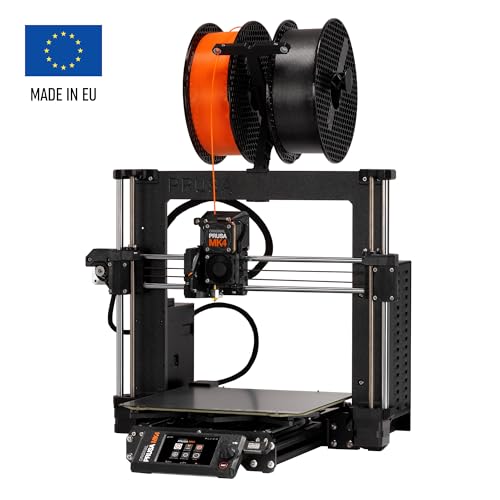
Why it ranks here: The Prusa MK4S represents the gold standard for open-source 3D printing — fully documented hardware and firmware, a massive community knowledge base, and legendary long-term reliability. It is the printer that other manufacturers benchmark against for print quality.
Key specs:
- 250x210x220mm build volume
- 200mm/s max speed with input shaping
- Open-source hardware and firmware (Marlin-based)
- PrusaSlicer — widely regarded as the best free slicer available
- Load cell bed leveling for automatic first-layer calibration
- Optional enclosure available for ABS and engineering materials
Standout features:
- Print quality is exceptional. Benchmarks consistently place the MK4S at or near the top for dimensional accuracy and surface finish, particularly at moderate speeds. The print community considers it the reference standard.
- PrusaSlicer is used by a significant portion of the 3D printing community regardless of what printer they own. It is free, open-source, and receives regular updates with cutting-edge features.
- The open-source ecosystem means every component is documented, replaceable, and upgradeable. Owner data shows MK4S printers running reliably for years with minimal maintenance.
What could be better:
- At 200mm/s, the MK4S is noticeably slower than CoreXY competitors running at 500-600mm/s. A print that takes 2 hours on a P1S may take 4-5 hours on the MK4S.
- $799 for a kit that requires assembly is a tough sell when the Bambu P1S costs $699 fully assembled with faster speeds and an enclosure.
- The bed-slinger design inherently limits speed compared to CoreXY architectures.
Who should buy this: Users who value open-source philosophy, want full control over their hardware and firmware, prioritize print quality over speed, or need a printer with a 5+ year support track record. Also ideal for educational settings.
Verdict: The best printer for users who want transparency, community support, and uncompromising print quality. It cannot match CoreXY machines on speed, but it remains the most trusted and well-documented printer in the hobby.
5. Elegoo Saturn 3 Ultra — Best Resin 3D Printer
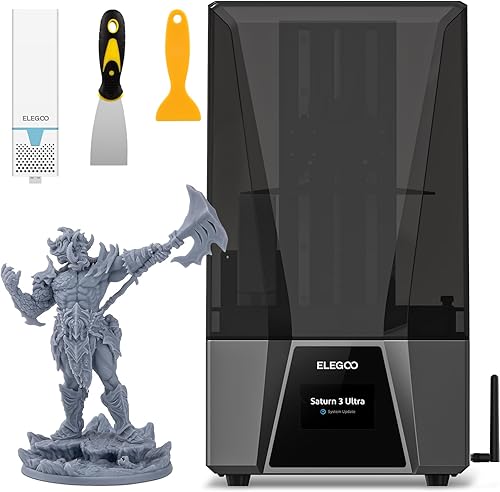
Why it ranks here: The Elegoo Saturn 3 Ultra brings 12K resolution to MSLA resin printing with a large 219x123mm build plate, making it the best option for miniatures, jewelry, dental models, and any application where sub-millimeter detail matters. FDM printers simply cannot match this level of precision.
Key specs:
- 12K mono LCD with 19x24 micron XY resolution
- 219x123x260mm build volume — among the largest in consumer resin printers
- 150mm/h max print speed
- Enclosed chamber with activated carbon filter
- Laser-cut build plate for improved adhesion
- Compatible with most 405nm UV resins
Standout features:
- 12K resolution at 19x24 micron pixel size produces detail that is difficult to distinguish from injection-molded parts. The print community reports crisp text, sharp edges on miniature weapons and armor, and smooth organic curves that require no post-processing.
- The build volume is generous for a resin printer. It fits multiple miniatures, full dental arches, or medium-sized figurines per print — batch printing that smaller resin machines cannot match.
- At $349, the price-to-resolution ratio is exceptional. Comparable 12K+ resolution from competitors costs $100-200 more.
What could be better:
- Resin printing requires post-processing — washing, curing, and handling uncured resin safely. It is messier and more involved than FDM printing.
- Resin fumes require ventilation. Even with the carbon filter, the print community recommends operating in a well-ventilated space or using an external exhaust setup.
- Material cost is higher than FDM filament, and resin prints are more brittle than FDM parts unless specialty tough resins are used.
Who should buy this: Miniature painters, tabletop gamers, jewelers, dental professionals, and anyone who needs extremely fine detail that FDM cannot achieve. Not recommended as a first and only printer — pair it with an FDM machine for functional parts.
Verdict: The best resin printer for most users. The Saturn 3 Ultra’s 12K resolution and large build plate make it the go-to choice for detail-critical applications at a competitive price.
How We Evaluated
Every 3D printer in this roundup was evaluated using manufacturer specifications, aggregated owner reviews from Amazon and 3D printing communities, benchmark data, and print quality comparisons. No products were personally tested. Our methodology prioritizes:
- Print quality: Dimensional accuracy, surface finish, and consistency across materials based on community benchmarks and owner-reported results.
- Speed vs. quality trade-off: Advertised speeds are compared against real-world owner data at usable quality settings, not maximum theoretical speeds.
- Reliability: Patterns from hundreds of verified reviews — first-print success rates, frequency of failed prints, and long-term durability.
- Software ecosystem: Slicer quality, firmware updates, cloud features, and ease of use.
- Value: Performance per dollar, factoring in what is included in the box versus required accessories.
- Material compatibility: Range of filaments or resins supported, including engineering-grade materials.
FAQ
What is the best 3D printer in 2026? The Bambu Lab P1S is the best overall 3D printer for most people. It combines enclosed CoreXY speed (500mm/s), AMS multi-color support, and Bambu’s plug-and-play ecosystem at $699. If budget is the priority, the Bambu Lab A1 Mini at $239 delivers remarkable quality for the price.
Should I buy an FDM or resin 3D printer? FDM printers are more versatile — they handle functional parts, large prints, and a wide range of materials with minimal post-processing. Resin printers produce far finer detail but require washing, curing, ventilation, and more careful material handling. Most users should start with FDM unless they specifically need miniature-level detail.
How much should I spend on a 3D printer? The $200-400 range offers excellent printers for hobbyists and beginners. For a deeper breakdown, see our 3D printer buying guide. Spending $600-800 gets you enclosed chambers, faster speeds, and multi-color capability. Going above $1,000 is only necessary for professional features like large build volumes, tool changers, or industrial material support.
Is 3D printing difficult to learn? Modern printers from Bambu Lab, Creality, and Prusa have dramatically reduced the learning curve. Auto-leveling, pre-configured slicer profiles, and cloud-based monitoring mean most users can produce successful prints within their first hour. The design side — learning CAD software or finding printable models — is where the real learning curve exists.